Why This Question Still Confuses People in 2026
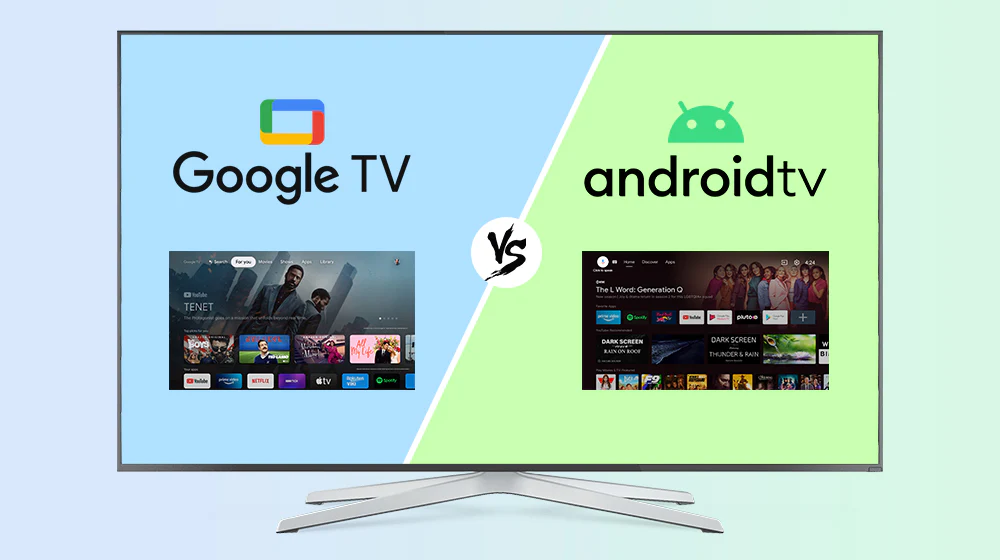
Android TV vs Google TV. Two names, one underlying platform, and enough overlap to confuse anyone trying to buy a smart TV box or streaming device in 2026.
You’re not overthinking it. The confusion is real — and it’s Google’s fault.
Here’s the short version: Google TV is not a separate operating system from Android TV. It’s a redesigned interface layered on top of the same Android TV foundation. Same engine, different interior. Same Google Play Store, same apps, same core functionality underneath — but a completely different experience on the surface.
The longer version — the version that actually helps you decide what to buy — is what this guide is for.
I’ve spent time with both platforms. I currently use an Android TV device as my daily driver. I’ve tested Google TV boxes too. I know what each one feels like after the novelty wears off and you’re just trying to find something to watch on a Tuesday night.
This is the honest comparison nobody else seems willing to write.
What Is Android TV?
Android TV launched in 2014 as Google’s first serious attempt at a smart TV platform. It was built on Android, meaning it could run apps from the Google Play Store, support Google Assistant, and integrate with the broader Google ecosystem.
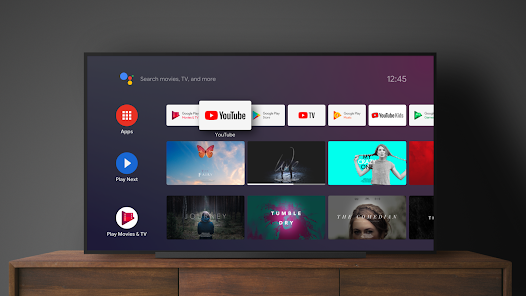
The interface was — and still is on older devices — app-centric. The home screen shows a horizontal ribbon of your installed apps. Below that, a “Play Next” row pulls in content recommendations. Below that, more rows from individual apps. It’s functional. It’s familiar. It looks a lot like the app drawer on an Android phone, stretched across a TV.
Android TV never felt glamorous. It was always more of a platform for developers and hardware manufacturers than something designed around how real people actually watch TV. But it worked, it was open, and it ran on everything from budget MECOOL boxes to Sony Bravia TVs.
The performance you get on Android TV depends heavily on the hardware. If your TV box is running slow, it’s almost always a hardware issue — RAM, processor, or storage — not the OS itself.
As of 2026, Android TV is still actively maintained. Devices running it still receive updates. But Google is clearly steering new hardware toward Google TV, and Android TV’s days as the default for new devices are numbered.
What Is Google TV?
Google TV launched in 2020 on the Chromecast with Google TV. It’s not a new operating system — it runs on top of Android TV — but Google redesigned the entire front-end experience from scratch.
The core idea behind Google TV is content-first discovery. Instead of asking “which app do I open?”, Google TV asks “what do you want to watch?” — and tries to answer it before you even think of the question.
The home screen is built around personalized recommendations pulled from every streaming service you’ve connected. Netflix, Disney+, YouTube, Prime Video, Hulu — Google TV aggregates them all into a single feed of suggestions based on your watching habits. It also has a dedicated Watchlist feature, so you can save shows from any app and come back to them later without remembering which service they live on.
Google TV also integrates Gemini — Google’s AI assistant — more deeply than Android TV ever integrated Google Assistant. On newer hardware like the ONN 4K Pro (2026) and Google TV Streamer, Gemini can answer complex queries, give full show summaries with audience reviews, and control smart home devices hands-free.
Since 2020, major TV brands including Sony, TCL, and Hisense have shifted their new smart TV lineups to Google TV. It’s the direction the platform is moving, and that trajectory is only accelerating in 2026.
Android TV vs Google TV: The Key Differences
Let’s get into what actually matters day-to-day.
Interface and Home Screen
This is the biggest practical difference between the two platforms, and it shapes the entire experience of using your TV.
Android TV uses a horizontal app grid. Your home screen shows icons for your installed apps, a Play Next row of content you’ve been watching, and some app-driven recommendation rows below. It’s clean, it’s simple, and it puts you in control. You know exactly where everything is. Nothing is hidden behind an algorithm.
Google TV flips the model entirely. The home screen is dominated by a large, visually rich carousel of recommended content — movies and shows pulled from all your linked streaming services. Below that, rows organized by category: “Continue Watching,” “Top Picks for You,” “Free to Watch,” and so on. There’s also a dedicated Apps tab if you want the old-style grid.
The honest difference: Android TV is like a filing cabinet. You know exactly where your apps are, and you go get them. Google TV is like a well-curated shelf that someone keeps rotating based on what you’ve been reading lately.
For people who subscribe to five or six streaming services and can’t always remember which one has the show they want, Google TV’s aggregated discovery is genuinely useful. For people who have two or three apps they always open and just want to get to them fast, Android TV’s directness is more satisfying.
Content Discovery
Android TV has content discovery built in — every device has a “Play Next” row and app-sourced recommendation rows. But the recommendations come from individual apps, not a centralized intelligence. Netflix suggests Netflix shows. YouTube suggests YouTube videos. The experience is siloed.
Google TV breaks down those silos. It pulls recommendations across all your connected services and serves them up together. If you finished a series on Netflix and you’re wondering what to watch next, Google TV might surface something on HBO Max, Hulu, or even a free ad-supported service you forgot you had. It doesn’t ask which app you want — it just finds you something to watch.
The Watchlist feature is a genuine quality-of-life improvement over Android TV. You see a trailer for something on social media, you add it to your Google TV Watchlist, and it’s waiting for you when you open the app — regardless of which streaming service it’s on. Android TV has no direct equivalent.
App Store and App Support
Both platforms use the Google Play Store. The app library is identical. You can install Netflix, Disney+, YouTube, Hulu, Prime Video, Plex, Kodi, IPTV players, emulators, VPNs — anything on the Play Store works on both.
The difference is in how apps are presented and managed. Google TV integrates apps into its content-first interface more fluidly. Android TV gives you more direct, manual control over your app list.
For sideloading — installing apps that aren’t on the Play Store — both platforms support it. Android TV has historically been more lenient about it, with fewer warning prompts and no restriction barriers. Google TV has gotten slightly more aggressive with warning screens when sideloading in recent updates, though it’s still possible and not locked down.
Worth noting: Google announced in early 2026 that certified devices like the ONN 4K Pro and Google TV Streamer may face new sideloading verification requirements starting September 2026 as part of a developer registration mandate. Non-certified AOSP boxes remain unaffected. If sideloading freedom is a top priority, an Android TV device or uncertified AOSP box is the safer long-term choice.
Remote and Voice Control
Both platforms support Google Assistant for voice search and smart home control. But Google TV goes further in a few practical ways.
The Google TV app on Android phones lets you use your phone as a full remote, including a touchscreen keyboard for typing — which is a genuine quality-of-life improvement over hunting and pecking through an on-screen keyboard with a D-pad. Android TV has a similar feature via the Google TV app, but it’s less integrated into the core experience.
Google TV remotes on newer devices also feature dedicated buttons for popular streaming services (Netflix, YouTube, Disney+) and a smart home shortcut. Some newer Google TV remotes include a Find My Remote function — useful when it disappears between couch cushions.
Android TV remotes tend to be simpler and more straightforward, which is either a feature or a limitation depending on your perspective.
Smart Home Integration
Both platforms support Google Home and smart home control via Google Assistant. But the execution differs.
On Google TV, smart home controls are front-and-center. There’s a dedicated dashboard accessible directly from the home screen. You can see the status of connected devices, control lights, check cameras, and run routines without leaving the TV interface.
On Android TV, smart home control goes through Google Assistant — you invoke it, give a command, and it executes. It works, but it requires an extra step every time, and there’s no persistent visual dashboard.
For households with a full Google Home setup — smart lights, thermostats, cameras, doorbells — Google TV’s integrated dashboard is meaningfully more convenient.
Gemini AI and Future Features
This is where the gap between the two platforms is widening fastest.
Google TV is becoming Google’s primary testbed for Gemini integration on the living room screen. On the Google TV Streamer and ONN 4K Pro (2026), Gemini can answer complex questions — not just “search for action movies” but “what should I watch if I liked Severance?” It provides full show summaries, audience reviews, cast details, and streaming availability — all on screen before you commit to watching.
There are also AI-powered screensavers on Google TV, personalized recommendation improvements driven by Gemini, and ongoing feature additions that are coming to Google TV first.
Android TV is not being deprecated, but it’s not where Google is investing new feature development. If you want the platform that will continue to gain capabilities over the next two to three years, Google TV is the answer.
Sideloading and Customization
This is the area where Android TV still wins clearly — and where my personal preference as an Android TV daily driver comes from.
Android TV, particularly on devices like the MECOOL KM2 Plus Deluxe and KM9 Pro Max, is more permissive about sideloading apps, running custom launchers, and configuring the system in non-standard ways. If you want to run Kodi on your Android TV box, Android TV is the friendlier environment — fewer barriers, better compatibility, and a longer community track record.
Kodi addons work more reliably on Android TV devices across the board. IPTV players, retro gaming emulators, and local media tools like Plex and Jellyfin all tend to behave better on the more open Android TV environment.
Google TV has introduced more friction in recent updates around sideloading — additional warning prompts, occasional app compatibility issues with non-Play Store installs. It’s not locked down, but it’s not as open as Android TV on an enthusiast-friendly device.
If your streaming setup involves apps that live outside the Google Play Store, Android TV is the friendlier environment.
Software Updates and Longevity
Google supports the Android TV OS across both platforms. Certified devices on both Android TV and Google TV receive core OS updates.
The practical difference: Google TV devices tend to receive interface and feature updates more frequently, because that’s where Google’s active development is focused. Android TV gets OS-level security and stability updates, but new features arrive more slowly.
For longevity, both platforms on certified hardware are reasonable bets. But if you want a device that will keep gaining new capabilities rather than just staying stable, Google TV is the better long-term investment.
Understanding the chip inside your device also matters for longevity — our Amlogic chipset guide breaks down which processors are worth buying in 2026 and which ones to avoid.
Full Comparison Table: Android TV vs Google TV
| Feature | Android TV | Google TV |
|---|---|---|
| Underlying OS | Android TV OS | Android TV OS |
| Home screen style | App grid | Content-first recommendations |
| Cross-app content discovery | Limited | Full aggregation |
| Watchlist feature | No | Yes |
| Google Play Store | Yes | Yes |
| Sideloading | Easy, few restrictions | Possible, more friction |
| Google Assistant | Yes | Yes |
| Gemini AI integration | Minimal | Deep, expanding |
| Smart home dashboard | Via Assistant only | Dedicated home screen panel |
| Phone as remote | Basic | Full-featured |
| Live TV tab | No | Yes |
| Best for | Enthusiasts, sideloaders, Kodi/Plex | Casual streamers, family homes |
| Future development focus | Maintenance | Active new features |
My Honest Take — I Daily Drive Android TV
I use an Android TV device every day, and I want to be straight with you about why — because it’s not because Android TV is objectively better.
I use Android TV because I know exactly what I want to watch before I turn on the TV. I have three or four apps I rotate between. I run Kodi on the side for local media. I sideload occasionally. For that specific workflow, the direct app-grid approach of Android TV is faster and less noisy than Google TV’s recommendation engine.
But I’m not a typical user.
When I’ve set up Google TV boxes for family members — people who don’t have a specific app in mind when they sit down, who just want to find something good to watch — Google TV works noticeably better. The aggregated recommendations genuinely help. The Watchlist stops them from forgetting what they wanted to watch. The Gemini summaries mean they don’t have to Google whether a movie is worth their time before pressing play.
Here’s the honest conclusion: Google TV is a better platform for most people in 2026. It’s more polished, it’s where Google is investing, and for casual viewers it removes friction in a way that Android TV never quite did.
Android TV wins for a specific type of user — the enthusiast who wants control, who sideloads apps, who runs Kodi or Plex, who doesn’t want an algorithm deciding what’s on the home screen. For that user, Android TV’s openness and directness is still genuinely preferable.
Know which one you are, and the choice is easy.
Who Should Choose Android TV?
Android TV is the right call if:
- You sideload apps regularly, run Kodi, or use IPTV players outside the Play Store
- You have a specific set of apps you always open and want fast, direct access
- You use a local Plex or Jellyfin media server and want maximum compatibility
- You prefer a device that doesn’t push algorithmic content at you on the home screen
- You’re buying a MECOOL, X96, or other enthusiast-brand device specifically for customization
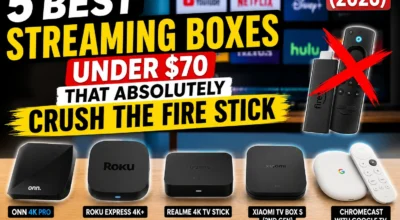
Best Android TV devices under $70: MECOOL KM2 Plus Deluxe (~$70), MECOOL KM9 Pro Max (~$63)
Who Should Choose Google TV?
Google TV is the right call if:
- You subscribe to multiple streaming services and want unified content discovery
- You live in a Google-heavy household — Android phones, Google Home, Chromecast
- You want a device that will keep gaining new features over the next two to three years
- You have family members who just want to find something to watch without knowing which app it’s on
- You’re buying a new smart TV or streaming box and want the most future-proof platform
Best Google TV devices under $70: ONN 4K Pro 2026 ($59.88), Xiaomi TV Box S 3rd Gen (~$65)
For a full breakdown of the best streaming boxes in this price range, see our guide to the best streaming box under $70.
Which Devices Run Each Platform?
Devices Running Google TV
- ONN 4K Pro (2026) — $59.88, Walmart
- ONN 4K Plus (2026) — ~$29, Walmart
- Google TV Streamer 4K — $99, Google Store
- Chromecast with Google TV — discontinued but still available
- Sony Bravia TVs (2021 and newer)
- TCL Google TV models (2022 and newer)
- Hisense Google TV models (select lines)
- Xiaomi TV Box S 3rd Gen — ~$65, Amazon
Devices Running Android TV
- MECOOL KM9 Pro Max — ~$63, Amazon
- MECOOL KM2 Plus Deluxe — ~$70, Amazon
- NVIDIA Shield TV — $149, Amazon
- NVIDIA Shield TV Pro — $199, Amazon
- Many X96, BuzzTV, and Formuler devices
Note: The NVIDIA Shield runs Android TV, not Google TV — which is one reason it remains the top pick for enthusiasts despite being older hardware.
FAQ
Is Google TV the same as Android TV? They share the same underlying operating system, but they are different experiences. Google TV is a redesigned interface layer built on top of Android TV. Think of Android TV as the engine and Google TV as the interior. Both access the Google Play Store and support Google Assistant, but the home screen, content discovery, and feature set are different.
Can I upgrade my Android TV device to Google TV? Not officially. Google TV is a separate launcher and interface, not a simple software update. However, some methods do exist — check our guide on how to convert an Android TV box to Google TV for the full breakdown of what’s possible and what to expect.
Is Android TV being discontinued? No. Google continues to maintain and update Android TV. However, new feature development is focused on Google TV, and most new smart TVs and streaming devices from major brands now ship with Google TV. Android TV will continue to receive security and stability updates, but it is not the future direction of the platform.
Which is better for Kodi and sideloading? Android TV, without question. Android TV devices — especially from enthusiast brands like MECOOL — are more permissive about sideloading, offer fewer warning prompts, and have a longer track record of compatibility with Kodi addons, IPTV players, and other non-Play Store apps.
Does Google TV work without a Google account? You need a Google account to access the full Google TV experience, including the Play Store and personalized recommendations. You can use some basic features without signing in, but the platform is designed around Google account integration.
Which platform has better Netflix 4K support? Both platforms support Netflix 4K on certified hardware. The key is the device certification, not the OS. The MECOOL KM2 Plus Deluxe (Android TV) and the ONN 4K Pro (Google TV) are both Netflix 4K certified. Always verify certification on the specific device before purchasing.
Will Google TV replace Android TV completely? Eventually, yes — that appears to be the direction. Google TV is already the default on most new smart TVs and streaming devices from major brands. Android TV will likely continue on enthusiast and business-grade hardware for years, but consumer devices are moving to Google TV as the standard.
Final Verdict
Android TV vs Google TV is not really a competition between two equals. It’s a question of which type of user you are.
Google TV is the better platform for most people in 2026. It’s more polished, more intelligent, more future-proof, and better designed for households with multiple streaming services and casual viewers who just want to find something good to watch. Major brands — Sony, TCL, Hisense, and now Walmart with the ONN lineup — have made it the standard for a reason.
Android TV still has a clear place. For enthusiasts, sideloaders, Kodi users, and people running local media servers, it offers openness and control that Google TV doesn’t match. The MECOOL lineup in particular keeps Android TV relevant for that audience.
My personal take: I use Android TV because of how I stream. But if I were setting up a TV for someone else — a parent, a partner who just wants to watch shows — I’d give them Google TV without hesitation. The discovery experience, the Watchlist, the Gemini integration — it removes friction in a way that matters for people who aren’t thinking about their streaming setup.
Buy for who you are, not for who you think you should be.
Ready to pick your device? See our full guide to the best streaming box under $70 for the top-rated options on both platforms available in the US right now.
Once you’ve picked your box, the next step is getting your apps set up — our how to install Google Play on any smart TV guide walks you through the whole process.
For the official breakdown of what Google TV supports, Google’s own platform page at https://tv.google/ is worth a look before you commit to hardware.