The F1 Rewind Kodi addon is hands down one of the best free tools I have found for Formula 1 fans who use Kodi. I personally tested it on my H96 Max Android TV box running Kodi 21 Omega, and I was genuinely surprised at how well it works — clean interface, multiple seasons, and it does not require Real-Debrid to get started.
If you missed a race weekend or want to go back and rewatch the 2023 season that Verstappen dominated, this addon is exactly what you need. In this guide I will walk you through every single step to get it installed and running in under 10 minutes.
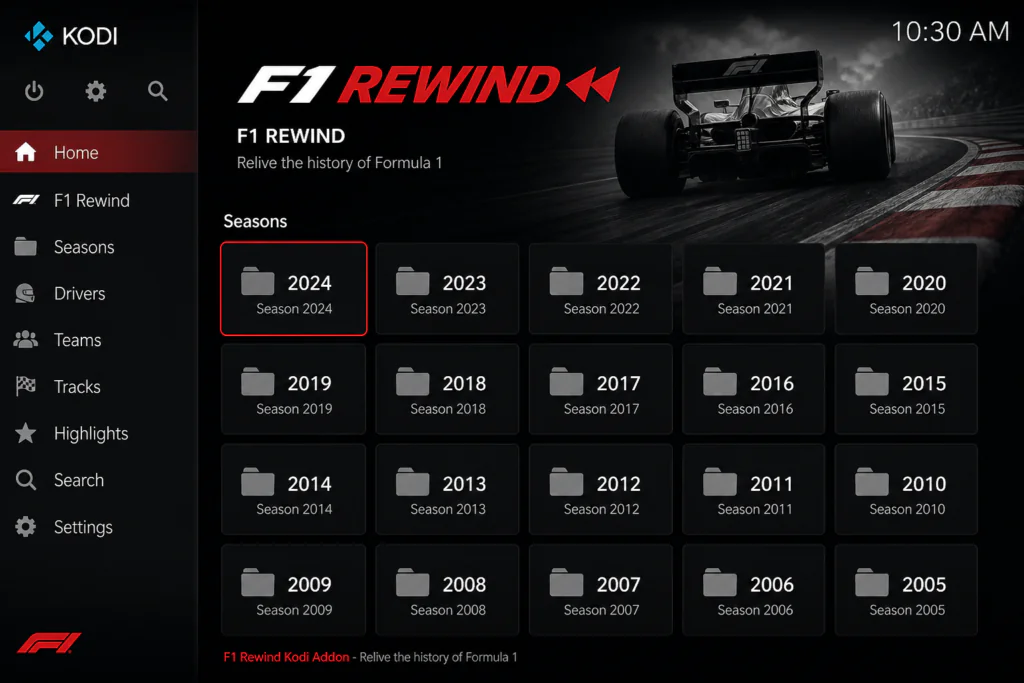
Quick Addon Info
- Addon Name: F1 Rewind Kodi Addon
- Repository: Z3RO Repository
- Repo URL: https://mylostsoulspace.co.uk/repo/
- Kodi Version: 20 Nexus and 21 Omega
- Real-Debrid: Optional
- Seasons Available: 2022, 2023, 2024, 2025
- Cost: Free
What Is the F1 Rewind Kodi Addon?
The F1 Rewind Kodi addon is a free video addon dedicated entirely to Formula 1 race replays. It is hosted inside the Z3RO Repository and gives you access to full race replays organised by season — 2022, 2023, 2024, and 2025.
What I like most about it compared to other sports addons is how focused it is. There is no noise, no mixed sports categories, no confusing menus. You open it, pick a season, pick a race, and it plays. That simplicity is rare in the third-party Kodi addon world and it makes a real difference when you just want to watch a race quickly.
It offers both free links and Real-Debrid links, so even if you do not have an RD account you can still use it right away.
What You Need Before Starting
Before you touch any Kodi settings, make sure you have:
- Kodi 20 Nexus or Kodi 21 Omega installed
- A stable internet connection
- The repo URL ready: https://mylostsoulspace.co.uk/repo/
- Optional: a Real-Debrid account
- Optional: a VPN (more on this below)
My personal tip: I always use a VPN before installing any third-party Kodi addon. It takes 30 seconds to connect and saves you a lot of headaches with ISP throttling later. I use NordVPN on my Android box and it works natively without any extra configuration.
Step 1 — Enable Unknown Sources in Kodi
Kodi blocks third-party installations by default. You only need to do this once.
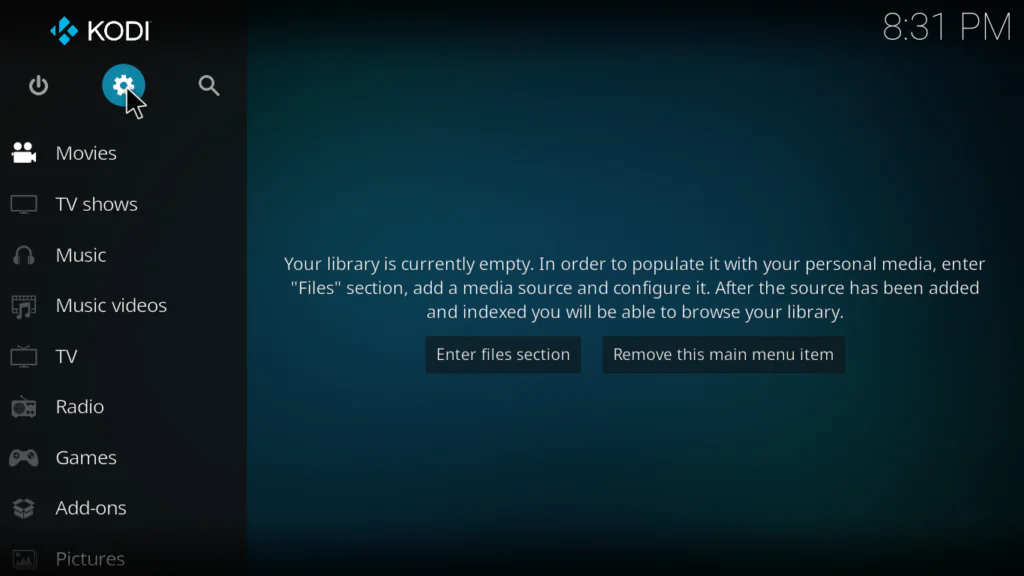
- From the Kodi home screen click the gear icon ⚙ at the top left
- Go to System
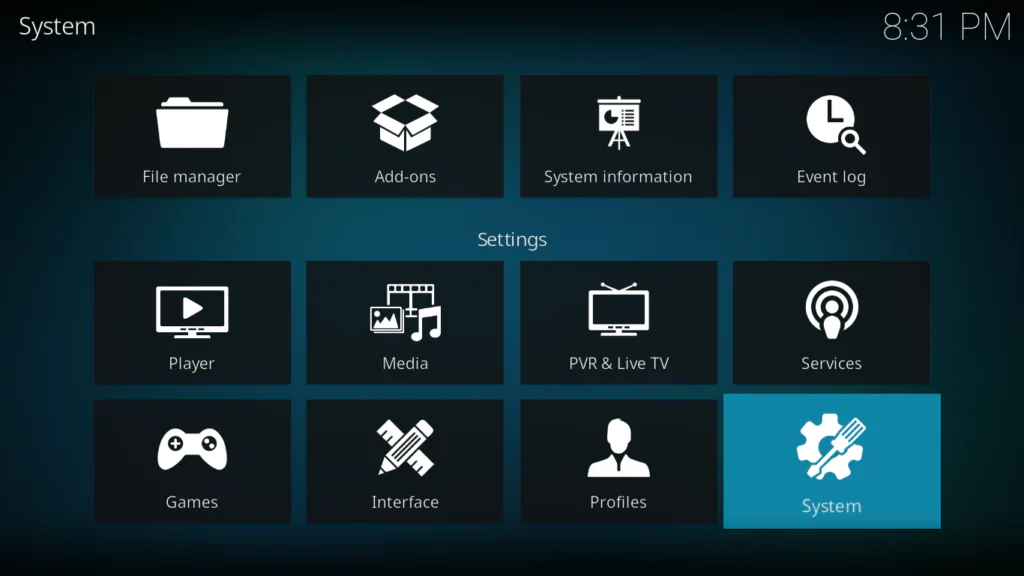
- Click Add-ons in the left sidebar
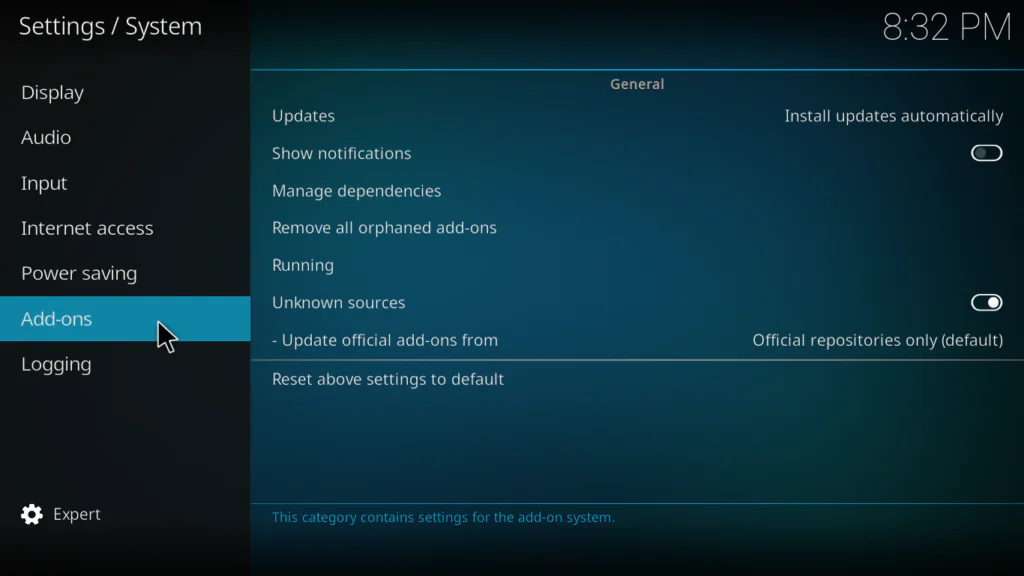
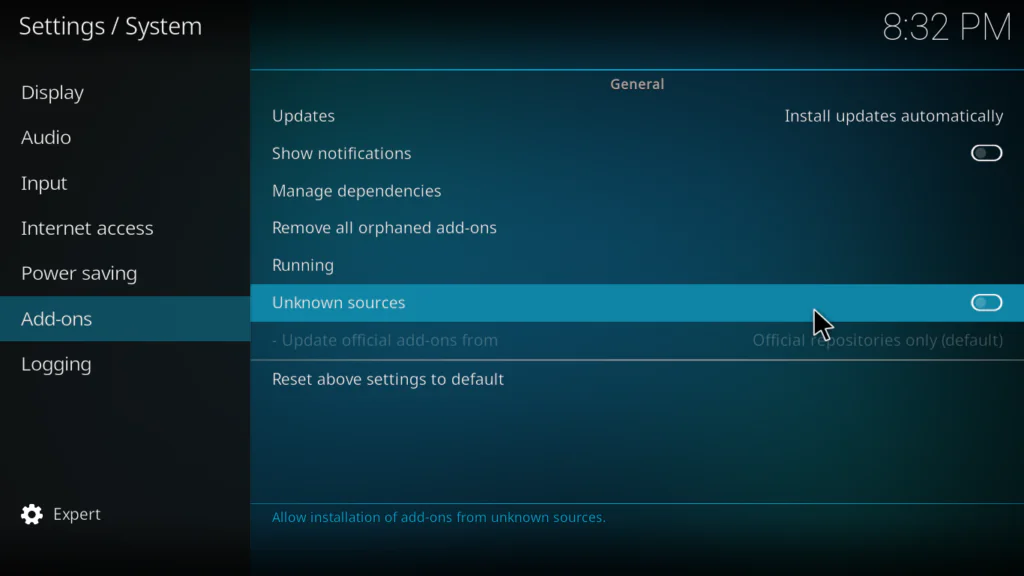
- Toggle Unknown Sources to ON
- Click Yes on the warning popup
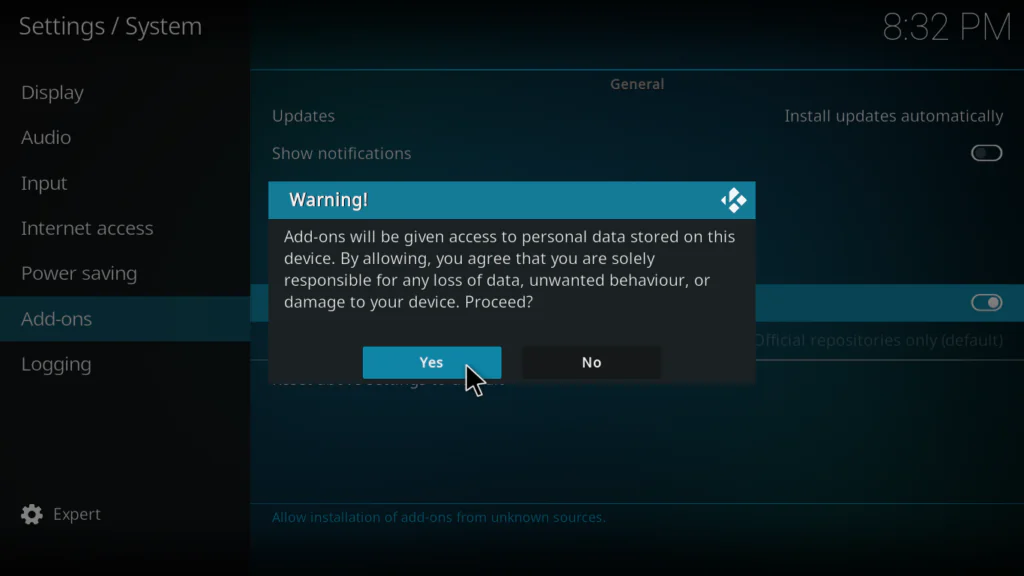
The first time I did this I got nervous about the security warning. It is completely normal — Kodi just wants you to confirm that you understand you are installing from outside the official Kodi repository.
Step 2 — Add the Z3RO Repository as a Source
This tells Kodi where to find the F1 Rewind Kodi addon repository.
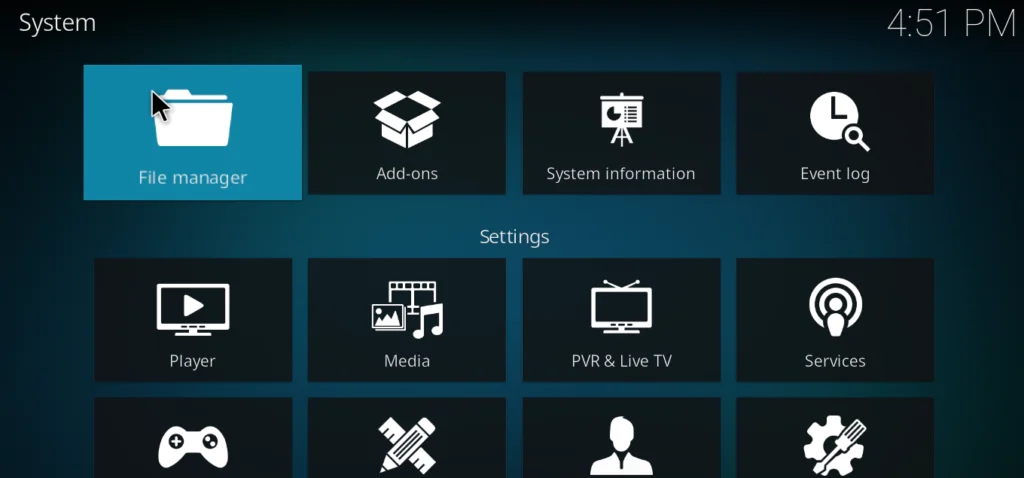
- Go back to Settings and click File Manager
- Double-click Add Source
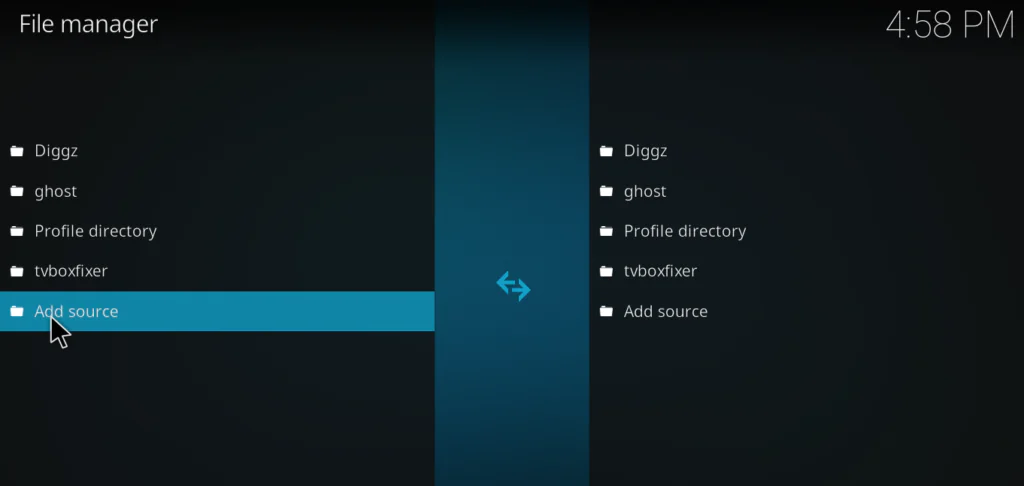
- Click where it says <None>
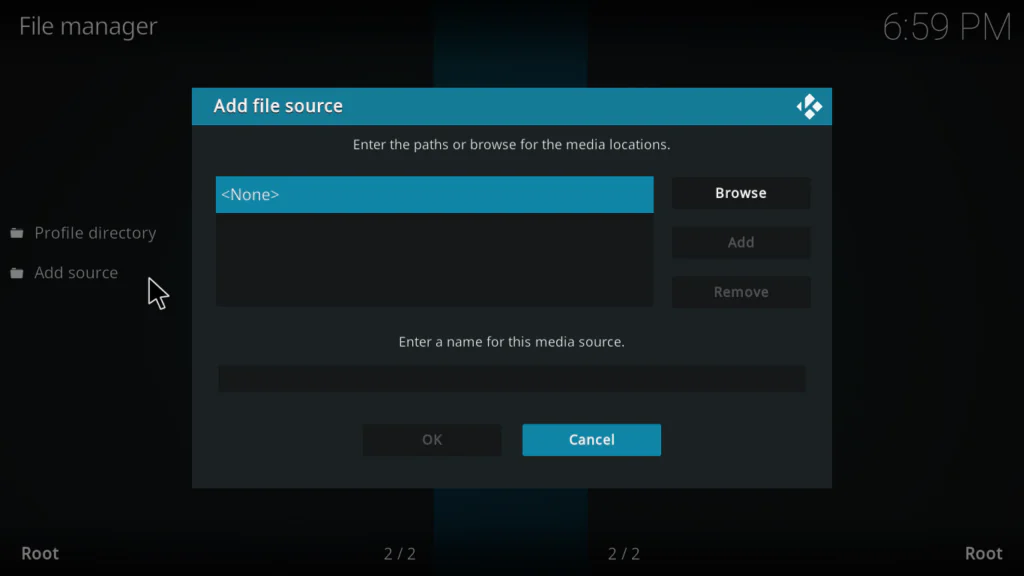
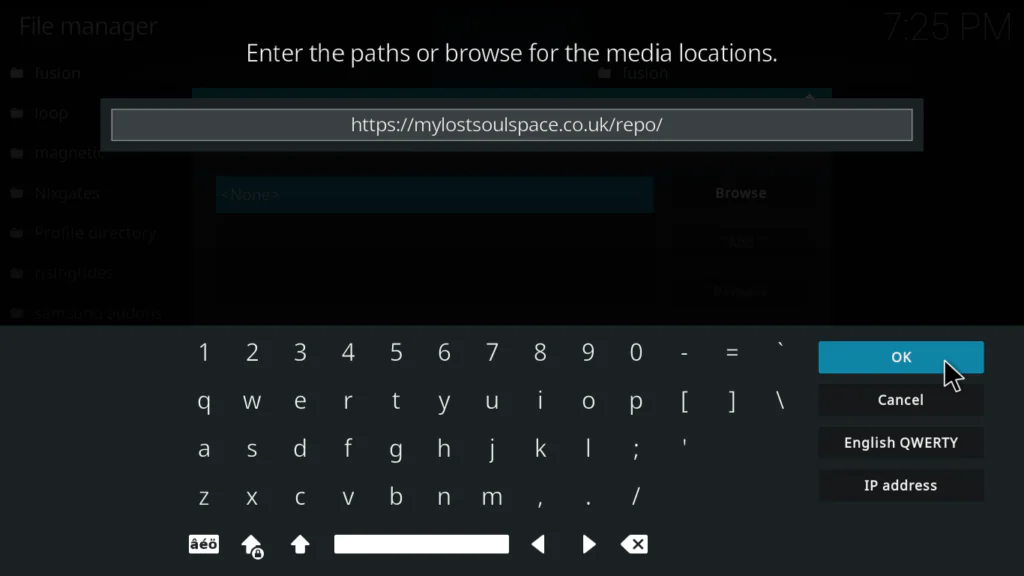
- Type the URL: https://mylostsoulspace.co.uk/repo/
- Name it zero in the name field below
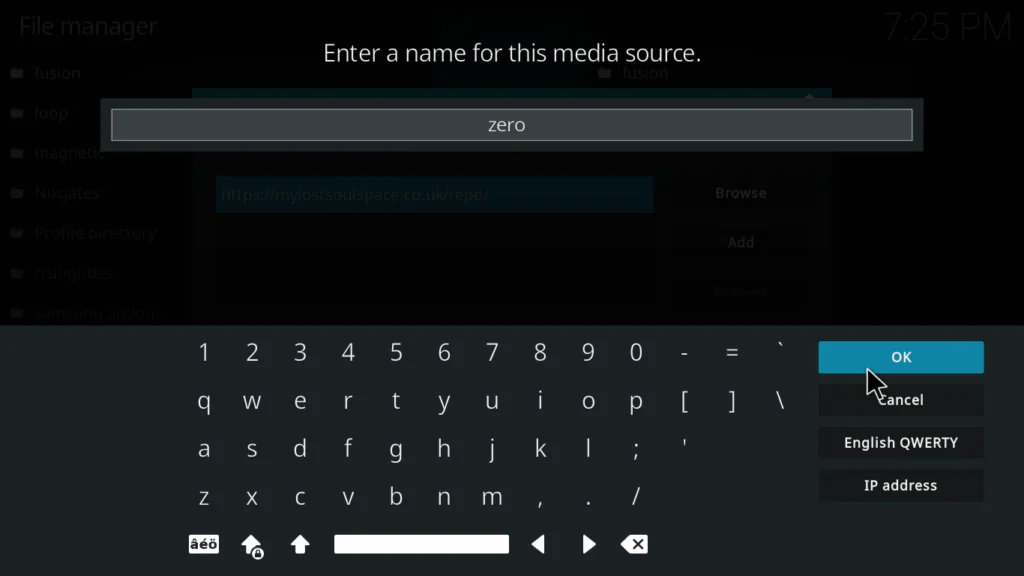
- Click OK to save
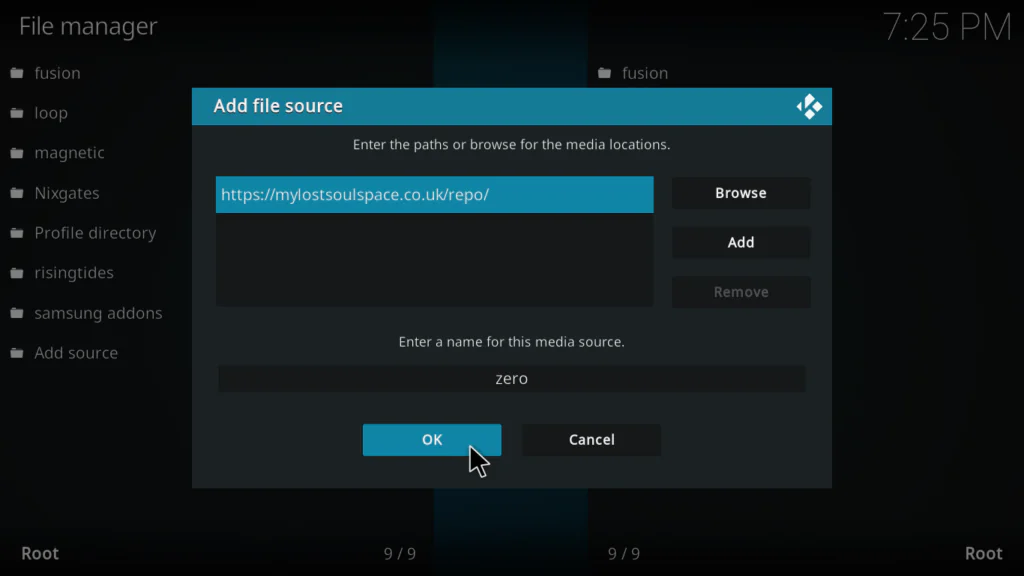
My experience: The first time I typed this URL I missed the trailing slash and got an error. Always include the / at the very end of the URL. Copy-paste it directly if you can.
Step 3 — Install the Z3RO Repository
- Go back to the main screen and click Add-ons
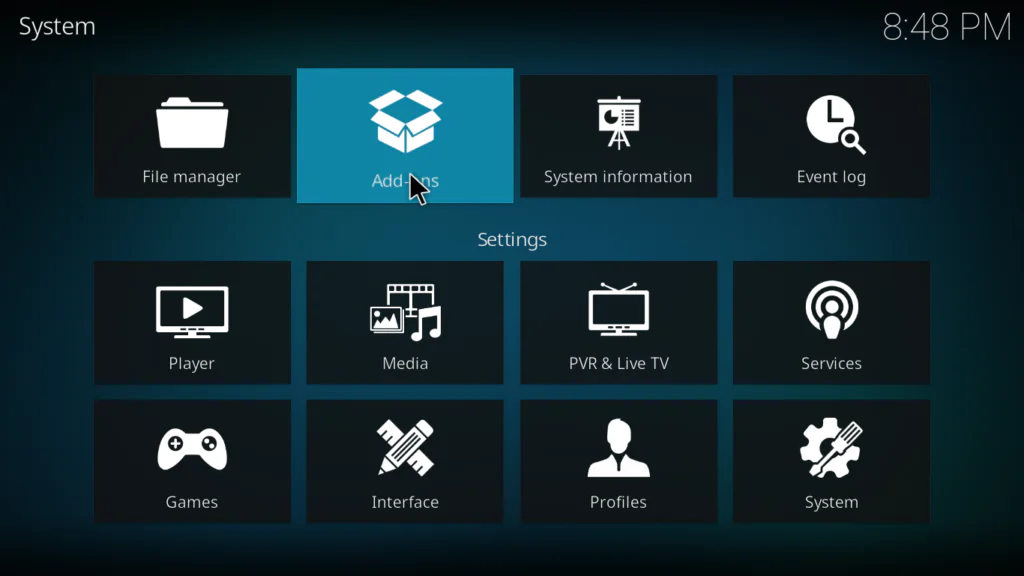
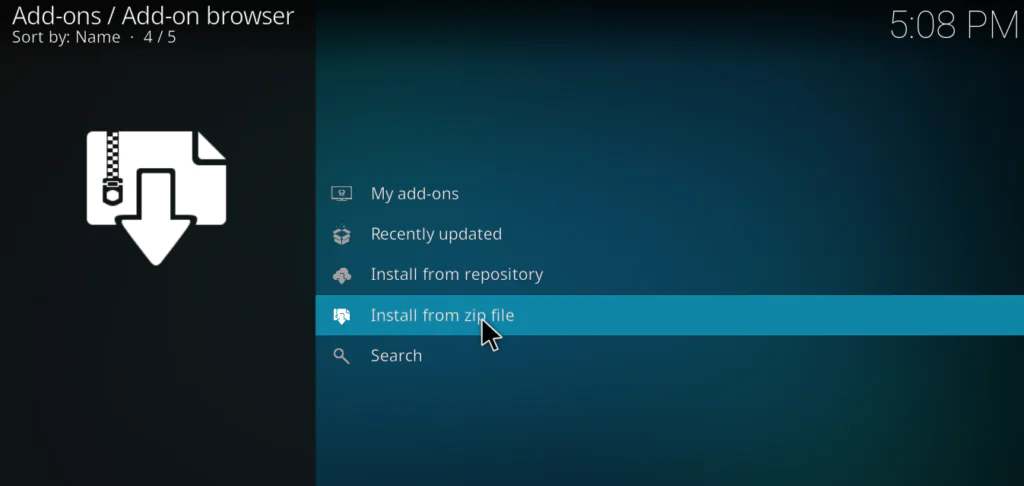
- Click Install from zip file
- Select your source named zero
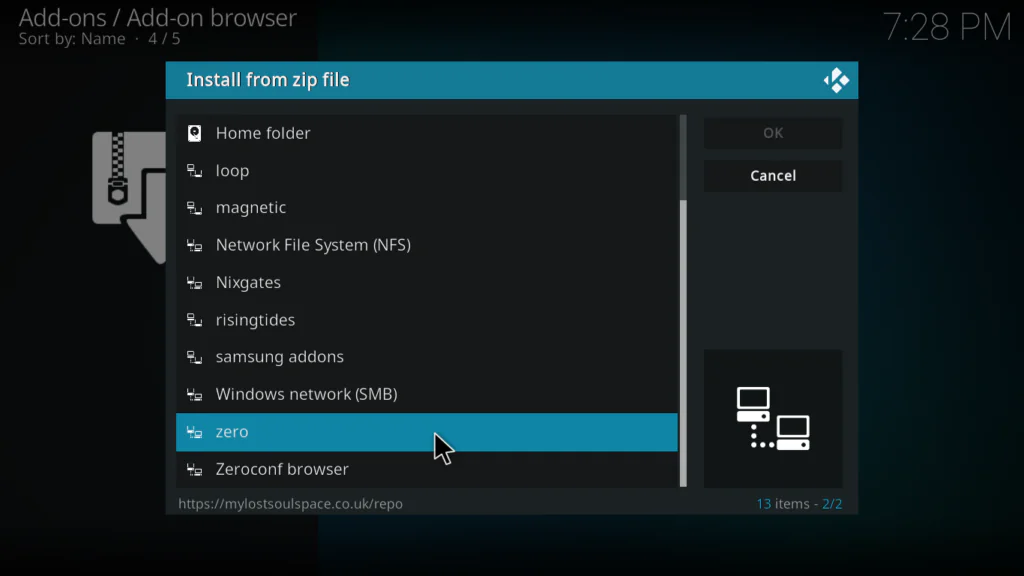
- Click repository.zero-1.0.0.zip
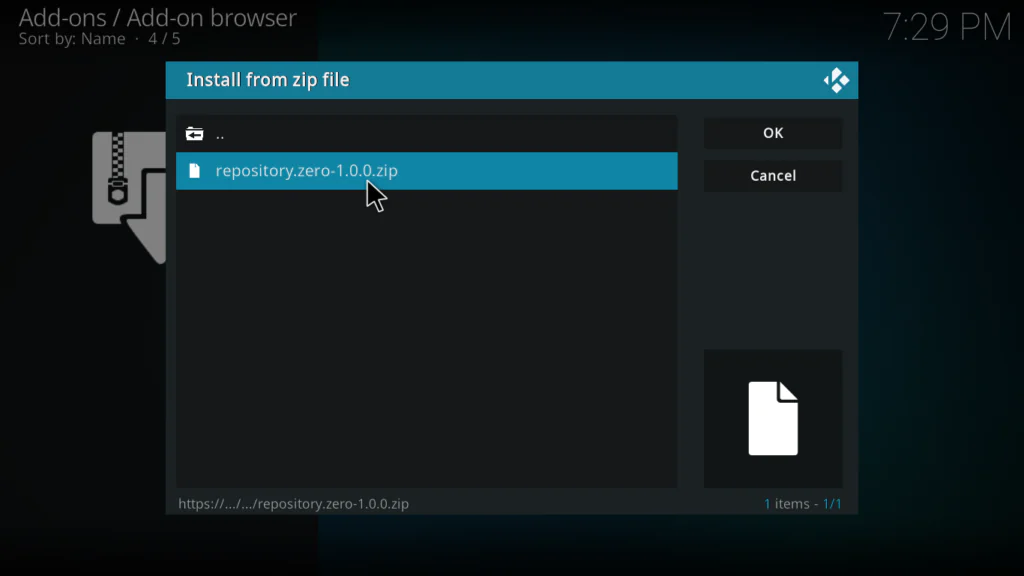
- Wait for the toast notification: Z3RO Repository Add-on installed
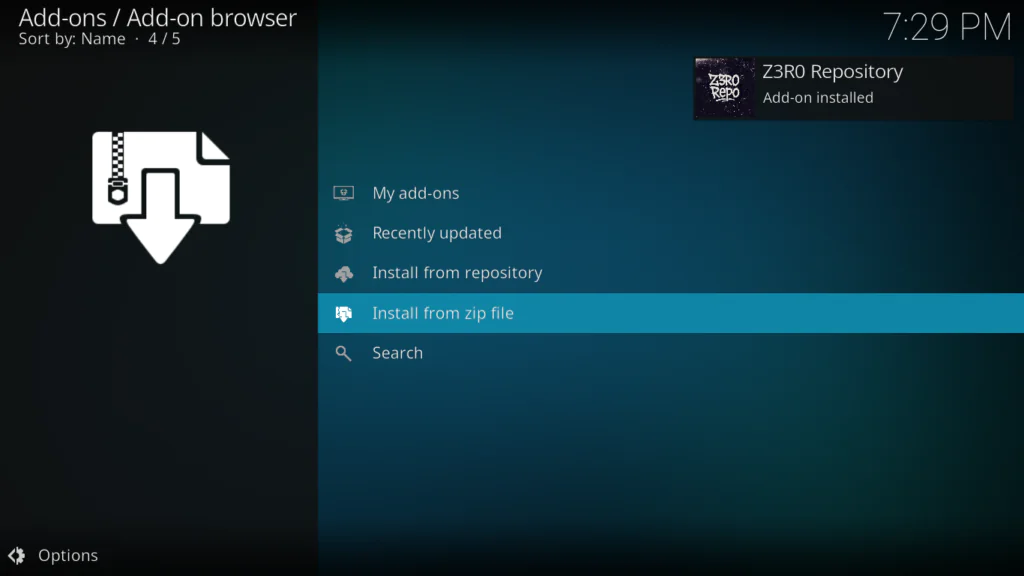
Do not rush past this step. Wait for the confirmation notification before moving on. If you skip ahead too fast and the repo has not finished installing, the next step will fail.
Step 4 — Install the F1 Rewind Kodi Addon
This is where it all comes together.
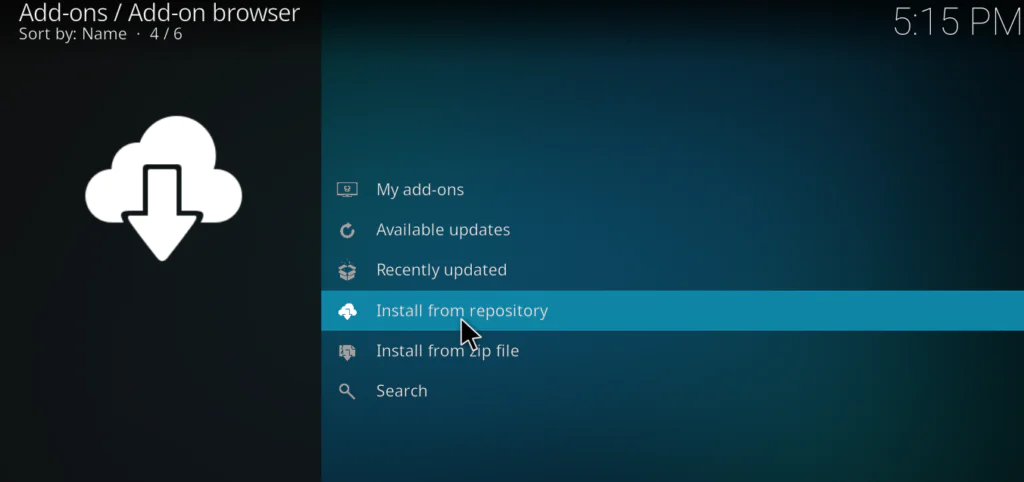
- Click Install from repository
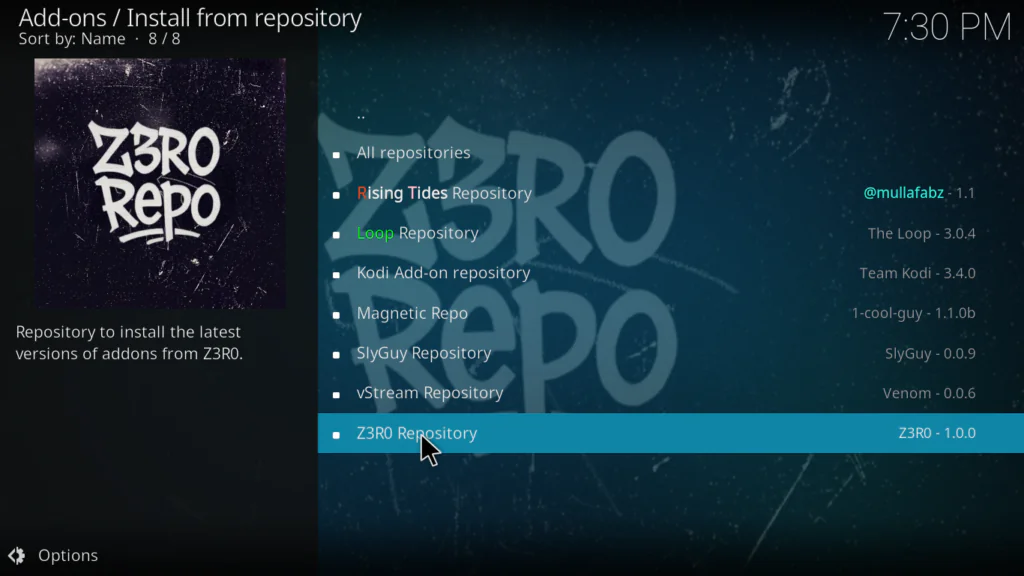
- Select Z3RO Repository
- Click Video Add-ons
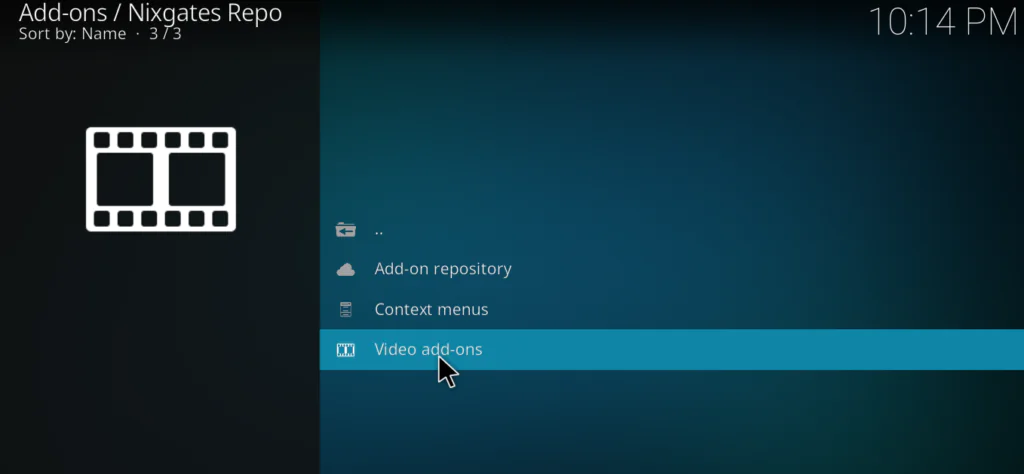
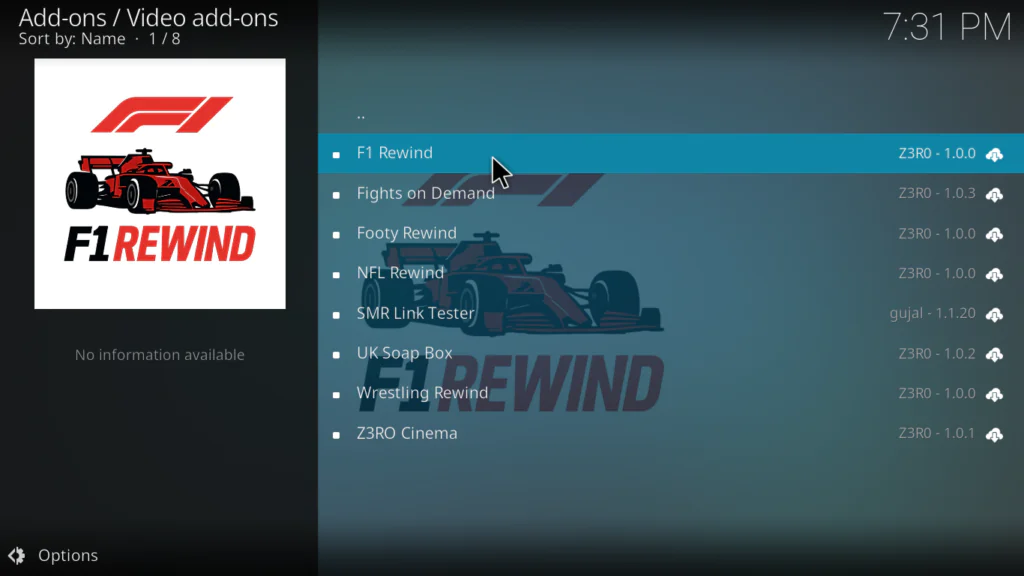
- Find and click F1 Rewind
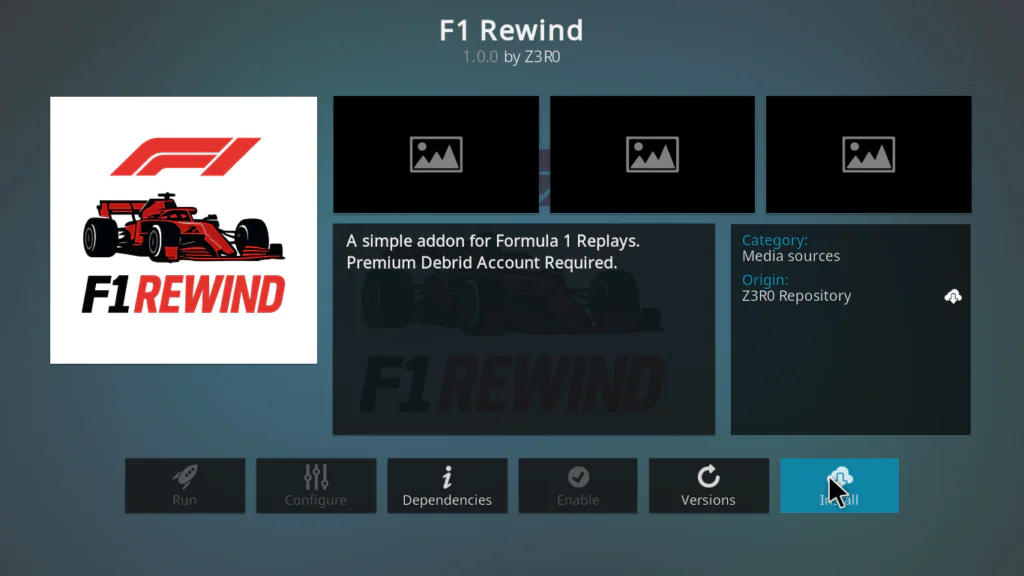
- Click Install
- Wait for the notification: F1 Rewind Add-on installed
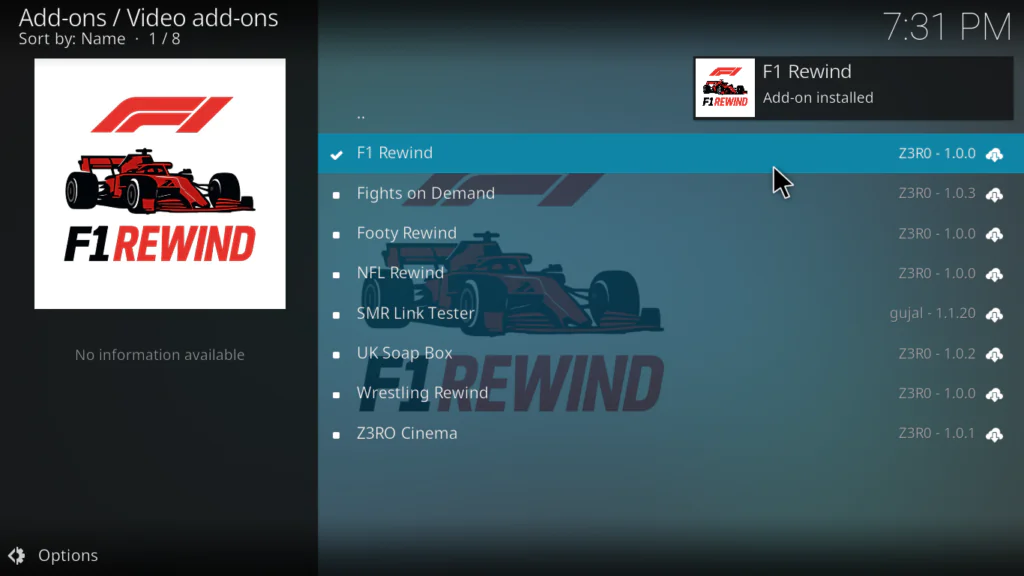
You will now find the F1 Rewind Kodi addon under Add-ons → Video Add-ons → F1 Rewind from the home screen.
Honestly, when I saw it appear in the list and clicked install, the whole process took about 8 seconds. It is one of the lightest addons I have installed. No long dependency chains, no waiting around.
Step 5 — Real-Debrid Setup (Optional)
You do not need Real-Debrid to use the F1 Rewind Kodi addon. The free Non-Debrid links work fine for most races. But if you have an RD account, here is how to link it:
- Right-click the F1 Rewind addon and select Add-on settings
- Go to the Accounts or Resolvers tab
- Select Real-Debrid → Authenticate
- Visit real-debrid.com/device on your phone or PC
- Sign in and enter the code Kodi shows on screen
- Authorization completes automatically
Real-Debrid costs around €3 per month. In my experience it is absolutely worth it if you stream Kodi addons regularly — the difference in stream quality and stability is significant. You can sign up at real-debrid.com.
How to Navigate the F1 Rewind Kodi Addon
Once you open the addon the layout is simple:
- Season folders — Pick 2022, 2023, 2024, or 2025
- Race folders — Each Grand Prix has its own folder
- Stream links — Choose Real-Debrid or Non-Debrid based on your setup
- Multiple sources — If one link fails, go back and try the next one
My favourite part is the 2023 season folder. I went back and rewatched the Bahrain Grand Prix opener and it played without a single buffer. That surprised me given it was a free link.
Do You Need a VPN for the F1 Rewind Kodi Addon?
Technically no, but I strongly recommend it.
When you stream through third-party Kodi addons, your traffic passes through external hosting servers that may log your IP address. A VPN encrypts your connection and hides your activity from both those servers and your ISP.
More practically, many ISPs throttle streaming traffic once they detect you are using Kodi. I noticed this on my own connection — streams that buffered constantly started playing smoothly the moment I connected my VPN.
For Android TV boxes, both NordVPN and ProtonVPN have dedicated apps that install directly from the Google Play Store. NordVPN is faster for streaming in my experience. ProtonVPN has a free tier if you only stream occasionally.
External resources for more information:
Troubleshooting the F1 Rewind Kodi Addon
F1 Rewind Kodi Addon URL Fails to Load
Check for a typo in the repo URL. Make sure the trailing slash is included: https://mylostsoulspace.co.uk/repo/ — go back to File Manager, right-click your source, and select Edit Source to correct it.
Zip File Not Appearing When Browsing Source
The repo server may be temporarily down. Open the URL in a phone browser to check if the site is live. Wait a few minutes and try again.
F1 Rewind Kodi Addon Crashes on Launch
This usually means a dependency failed to install. Uninstall the addon, clear Kodi’s cache under Settings → File Manager → Profile directory → Thumbnails, then reinstall from scratch.
Constant Buffering on All Streams
Try these three steps in order: switch to a Real-Debrid link, connect a VPN, then increase Kodi’s cache size by editing the advancedsettings.xml file in your userdata folder.
No Streams Available on Any Race
Individual hosting links expire over time. Try a different race or season to confirm the addon is working. If all content fails, check the Z3RO Repository for an updated version of the F1 Rewind Kodi addon.
Pros and Cons of the F1 Rewind Kodi Addon
Pros:
- Completely free with no account required
- Focused entirely on F1 — no clutter
- Four full seasons available (2022–2025)
- Works without Real-Debrid
- Lightweight and fast even on budget boxes
- Multiple stream sources per race
- Regularly updated through the Z3RO Repository
Cons:
- Replay only — no live race streams
- Free links can be slow without Real-Debrid
- Individual links occasionally expire
- No qualifying or practice session content
- Requires Unknown Sources to be enabled
FAQ
What is the F1 Rewind Kodi addon? The F1 Rewind Kodi addon is a free third-party Kodi video addon that gives access to Formula 1 race replays from the 2022, 2023, 2024, and 2025 seasons. It is installed through the Z3RO Repository.
Is the F1 Rewind Kodi addon safe to install? The installation process follows the same steps as any standard third-party Kodi addon. Using a VPN while streaming is always recommended for privacy and to avoid ISP throttling.
Does the F1 Rewind Kodi addon work on Firestick? Yes. Install Kodi on your Firestick first, then follow the same steps above. The process is identical on any device that runs Kodi.
Do I need Real-Debrid for the F1 Rewind Kodi addon? No. The addon has free Non-Debrid links built in. Real-Debrid is optional and improves stream quality but is not required.
Why is the F1 Rewind Kodi addon not showing in the Z3RO Repository? Make sure the Z3RO Repository installed successfully — you should have seen the confirmation notification. Scroll through Video Add-ons carefully. If it is missing, uninstall the repo and reinstall it from step 3.
Does the F1 Rewind Kodi addon have live races? No. It is a replay addon only. For live F1 streams you would need a different sports addon.
Final Thoughts
The F1 Rewind Kodi addon is one of those rare third-party addons that does exactly what it says with no drama. Clean interface, solid content, and it just works — even on my older budget Android box that struggles with heavier addons.
If you are an F1 fan and you are not using this yet, install it today. The whole process takes less than 10 minutes and costs you nothing. Real-Debrid is worth adding if you stream regularly, but even without it the free links held up well in my testing.
If you run into any issues not covered above, drop a comment below and I will help you sort it out.
⚠️ Legal Disclaimer: TVBoxFixer.com has no affiliation with Kodi, the Z3RO Repository, or any third-party addon developer. This article is for informational purposes only. Always use Kodi with content you own or that is in the public domain. TVBoxFixer.com does not host or endorse pirated content of any kind.