Introduction
7Plus Kodi addon is one of the best free streaming addons available for Kodi right now — especially if you enjoy live sports, Australian TV, or just want a massive library of free content without paying a cent.
7Plus is Australia’s most popular free streaming platform, run by Channel 7 — one of Australia’s three major free-to-air broadcasters. It offers live TV, thousands of on-demand shows, movies, sports, news, documentaries, kids content, and much more.
The best part? The 7Plus Kodi addon brings all of that directly inside Kodi — and strips out most of the ads in the process.
No subscription. No cable. No Roku device. Just install, open, and start watching.
In this guide I’ll walk you through exactly how to install the 7Plus Kodi addon from the SlyGuy Repository, step by step. Whether you’re in Australia or anywhere else in the world, this guide covers everything you need.
Let’s get into it.
What Is the 7Plus Kodi Addon?
7Plus is the official free streaming platform of Australia’s Channel 7 network. In Australia, it’s available as an app on smart TVs, phones, and tablets — completely free and ad-supported, similar to how Pluto TV or Tubi works in the US.
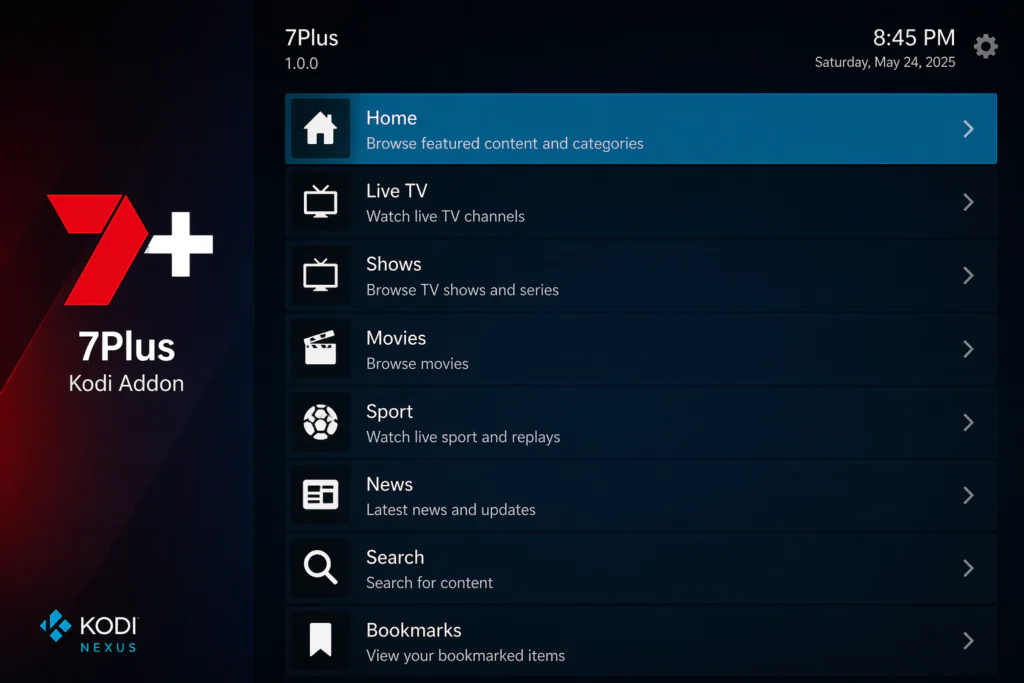
It covers five main Channel 7 networks:
- 7 — the main Channel 7 broadcast
- 7mate — entertainment, sport, and action
- 7TWO — lifestyle, drama, and documentaries
- 7flix — movies and popular series
- 7Bravo — reality TV and entertainment
The 7Plus Kodi addon is found in the SlyGuy Repository — the same trusted repository that hosts Plex Live, the Roku Channel addon, and PBS Live. It brings the full 7Plus experience directly inside Kodi, with the added bonus of significantly fewer ads than the official 7Plus app.
What Can You Watch?
This is where the 7Plus Kodi addon really shines — the content variety is genuinely impressive.
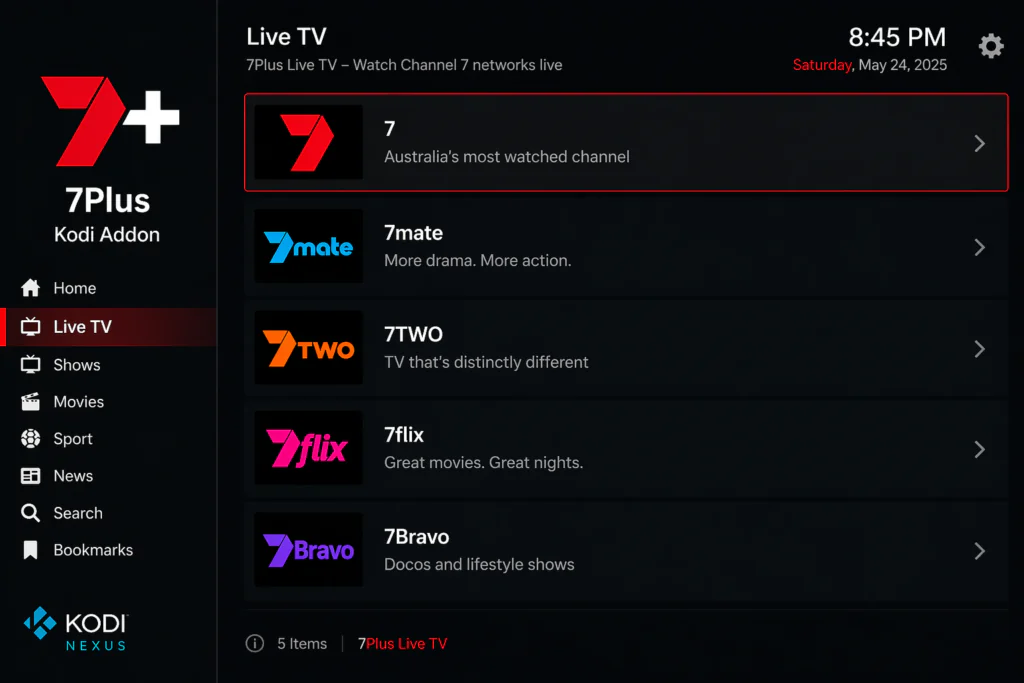
Live TV channels available:
- 7 — main Channel 7 live broadcast
- 7mate — live sports, action, and entertainment
- 7TWO — lifestyle, drama, and factual content
- 7flix — movies and popular series
- 7Bravo — reality TV and entertainment shows
On-demand content categories:
- Shows — hundreds of Australian and international TV series
- Movies — drama, comedy, action, thriller, family
- Sport — live and on-demand sports including AFL, cricket, boxing, and more
- News — live news and current affairs programs
- Kids — family-friendly shows and cartoons
- Documentaries — factual and investigative content
- Comedy — stand-up and comedy series
- International — content from global networks
Popular titles available include Hot Ones, ONE Friday Fights, Nashville, and many exclusive 7Plus originals.
Features of the 7Plus Kodi Addon
Here’s everything the addon offers:
- Live TV from all 5 Channel 7 networks
- Thousands of free on-demand shows, movies, and sports
- Ad-free or significantly reduced ads compared to the official 7Plus app
- Clean interface with Home, Live, Shows, Movies, Sport, News, Categories, Search, and Bookmarks
- Built-in search to find content quickly
- Bookmarks to save favourite shows and channels
- Multiple streaming quality options for different connection speeds
- Hosted in the trusted SlyGuy Repository — regularly updated
- Compatible with Kodi 20 Nexus and Kodi 21 Omega
- Works on Android TV boxes, Fire Stick, Windows, Mac, Linux, and Raspberry Pi
The combination of live TV plus a full on-demand library in one addon is something most free Kodi addons simply don’t offer. With 7Plus you get both — and it’s all free.
Is the 7Plus Kodi Addon Safe and Legal?
This is worth answering honestly.
7Plus is a 100% legal, officially licensed streaming platform operated by Channel 7 — one of Australia’s major broadcasters. All content is properly licensed for Australian viewers.
The SlyGuy Repository is one of the most respected third-party Kodi repositories available. It hosts only legal streaming addons and is regularly maintained by its developer.
However, there are a few important things to know:
- 7Plus is geo-restricted to Australia — if you’re outside Australia, you’ll need a VPN with an Australian server to access content
- The addon accesses 7Plus streams through an unofficial method — similar to how the Roku and Plex addons work
- Always use the official SlyGuy repo URL — https://slyguy.uk — never random URLs from unknown websites
For general online privacy while streaming, a VPN is always a good idea regardless of what you’re watching. You can learn more about why online privacy matters at the EFF’s privacy guide at eff.org/issues/privacy.
Before starting, make sure you have Kodi installed. Download it for free from the official Kodi website at kodi.tv.
Requirements Before You Start
Make sure you have these ready before starting:
- Kodi 20 (Nexus) or Kodi 21 (Omega) installed on your device
- A stable internet connection — at least 5 Mbps for smooth live TV
- Unknown Sources enabled in Kodi settings — I’ll show you how below
- A compatible device — Android TV box, Fire Stick, Windows PC, Mac, or Raspberry Pi
- A VPN with an Australian server if you’re outside Australia
- Optionally, a free 7Plus account — some on-demand content may ask you to sign in. Creating one is free at 7plus.com.au
If you’ve never installed a Kodi addon before, read this beginner guide on how to install Kodi addons first.
Step-by-Step Installation Guide for the 7Plus Kodi Addon
Follow each step carefully. The whole process takes under 10 minutes.
Step 1: Enable Unknown Sources in Kodi
This allows Kodi to install addons from outside the official repository. You only need to do this once.
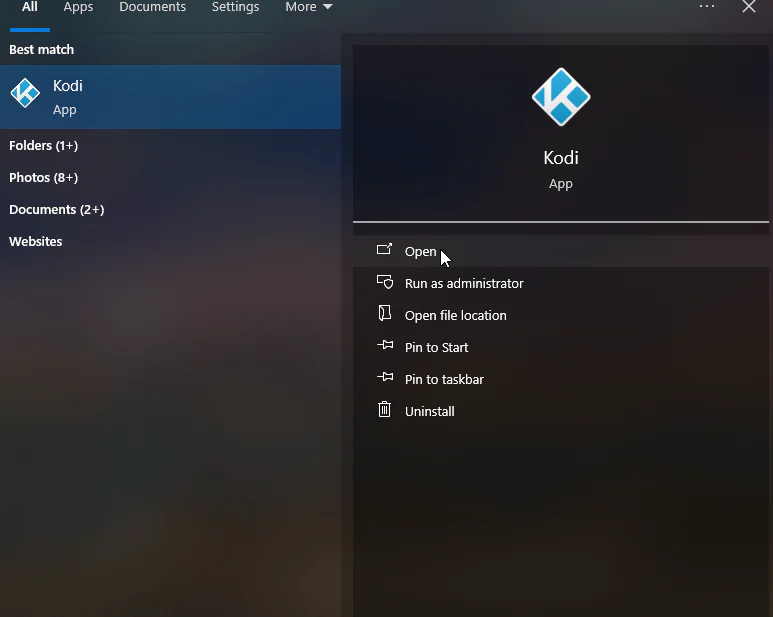
- Open Kodi on your device
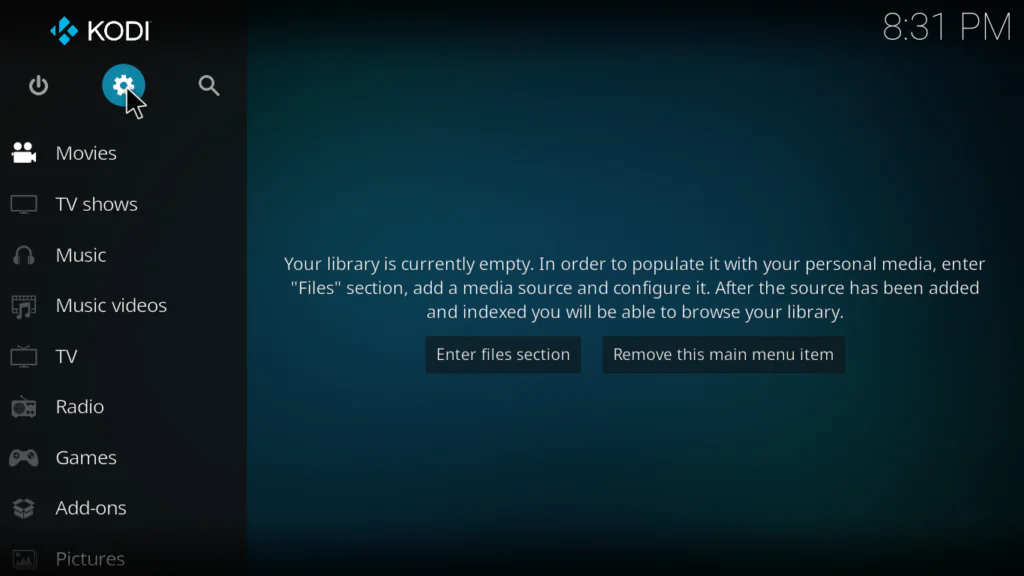
- Click the gear icon at the top left of the home screen to open Settings
- Click System
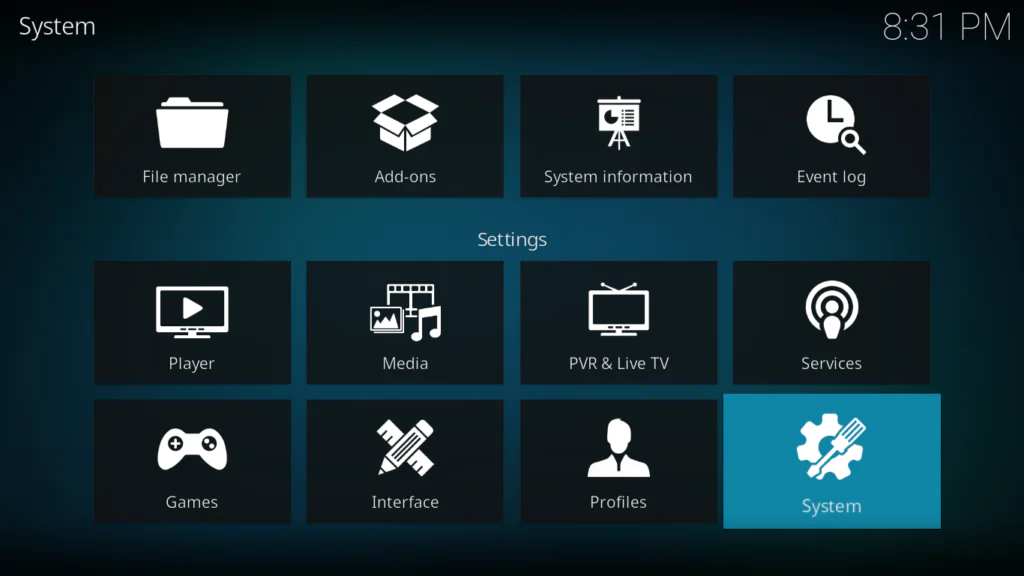
- Select Add-ons from the left menu
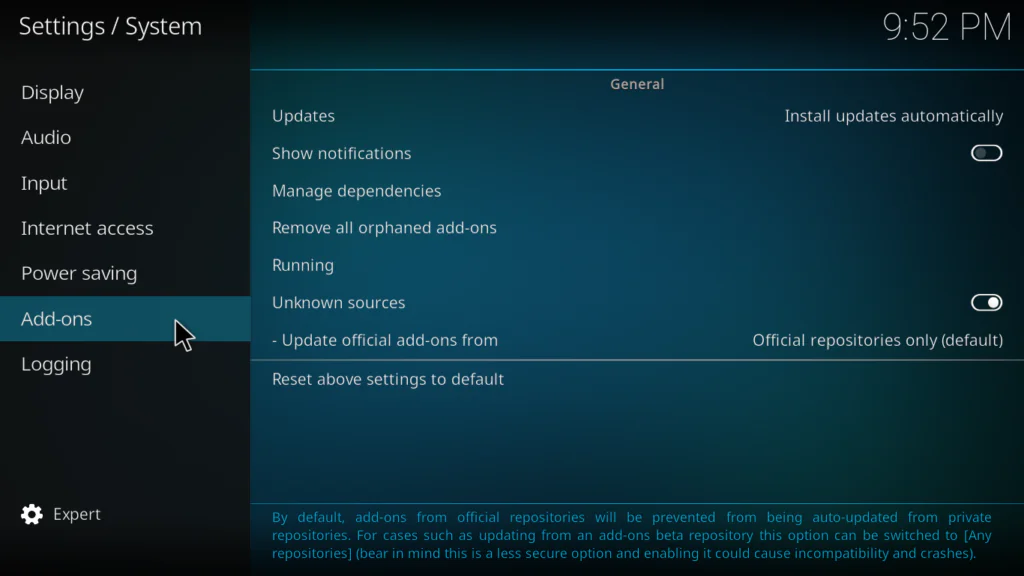
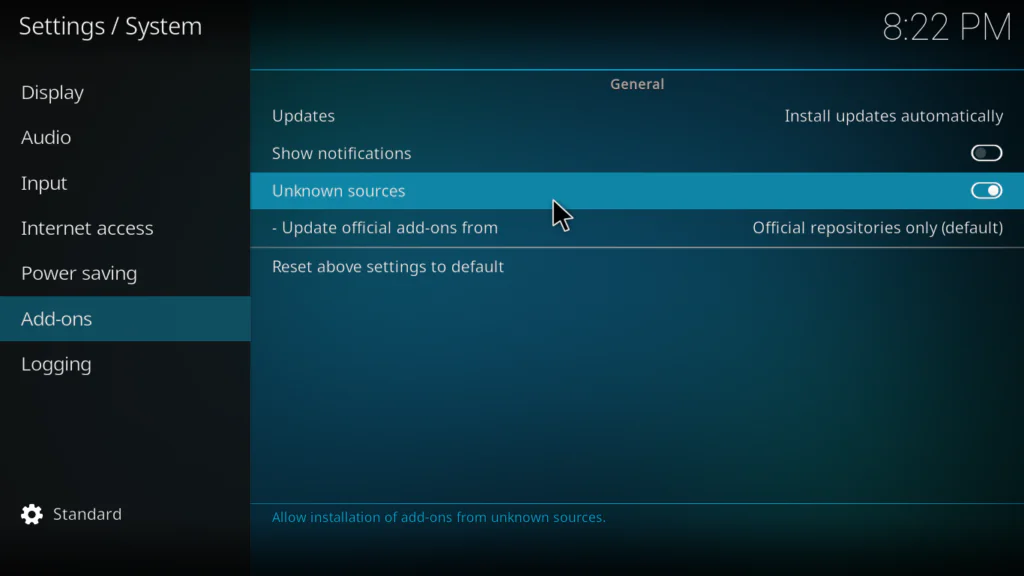
- Toggle Unknown Sources to ON
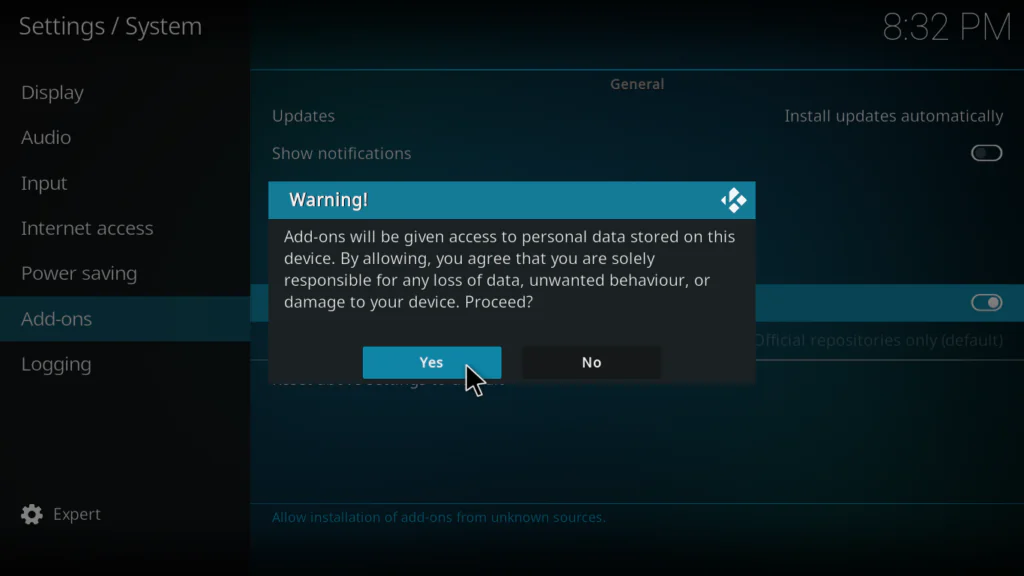
- A warning popup will appear — click Yes to confirm
Step 2: Add the SlyGuy Repository in File Manager
- Go back to the main Settings screen
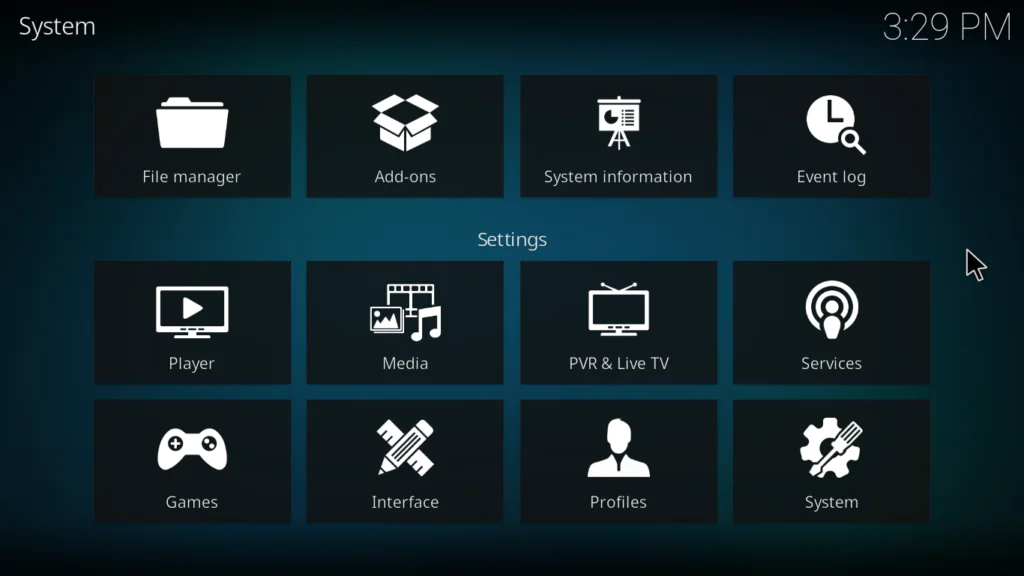
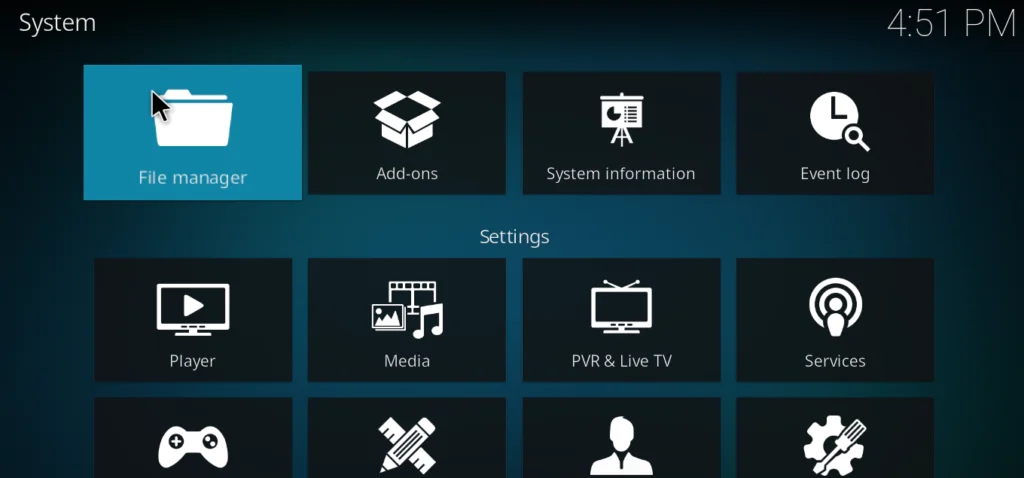
- Click File Manager
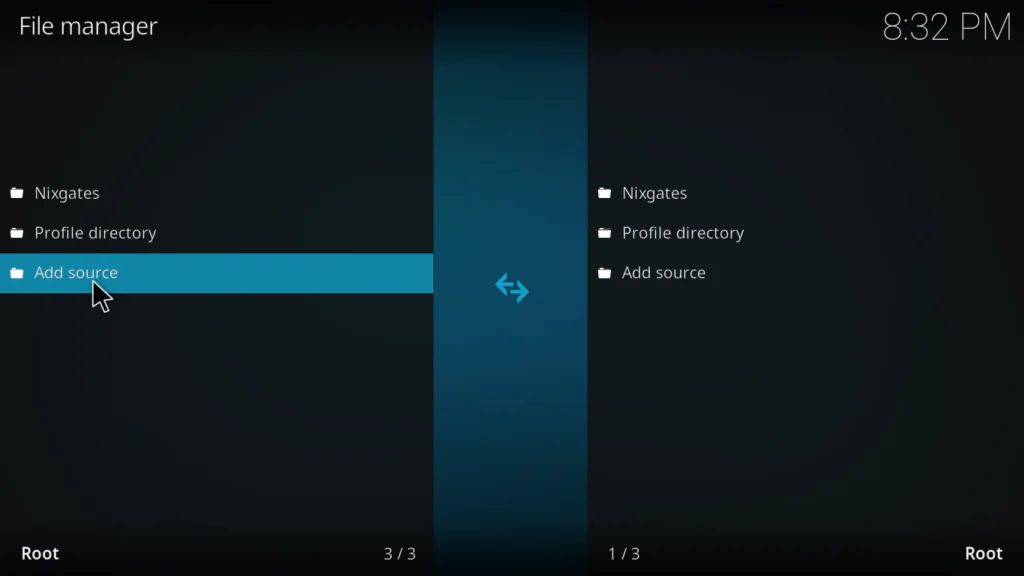
- Double-click Add Source on the left panel
- Click where it says None
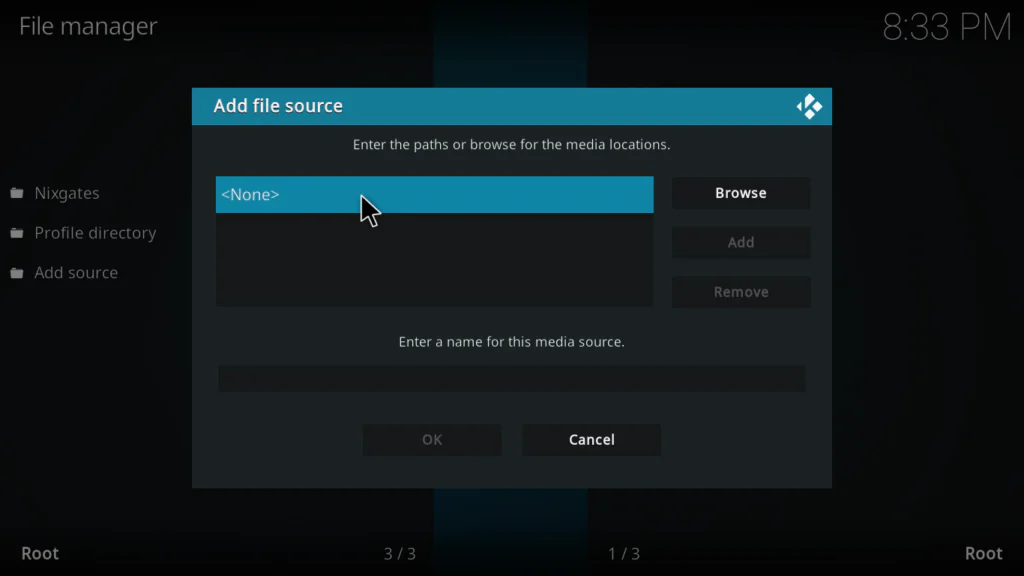
- Type this URL exactly: https://slyguy.uk
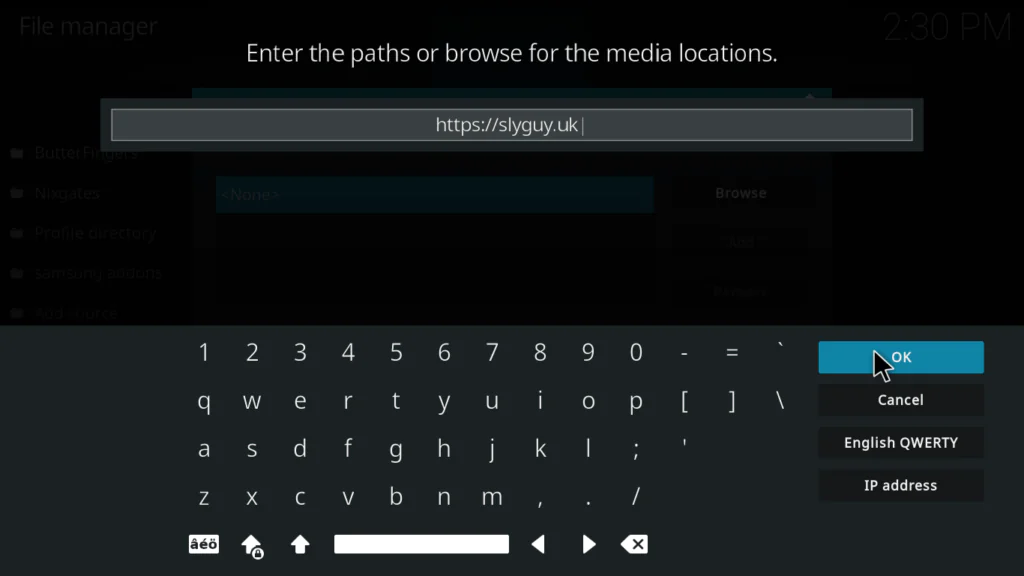
- In the name field below, type: slyguy
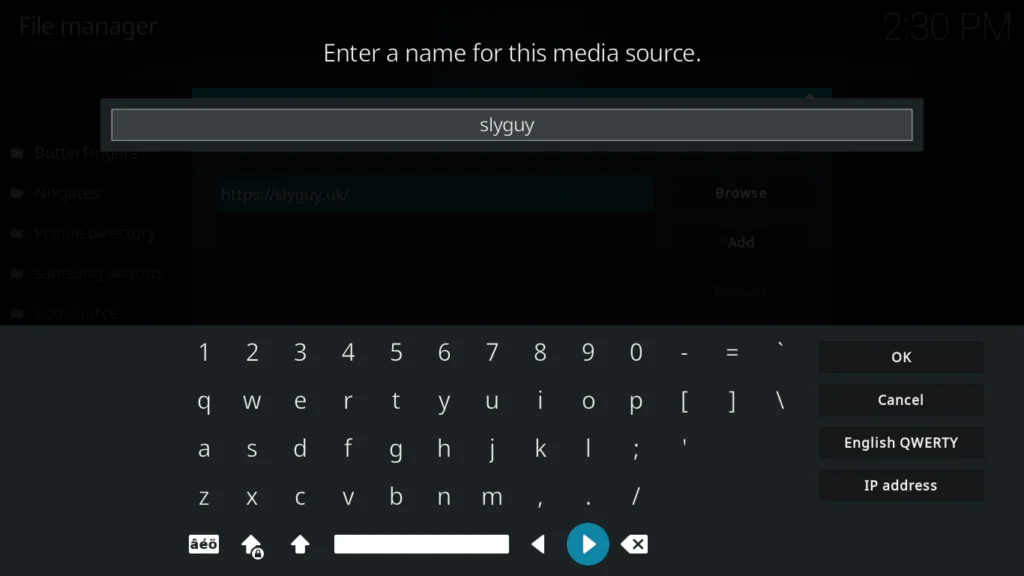
- Click OK to confirm
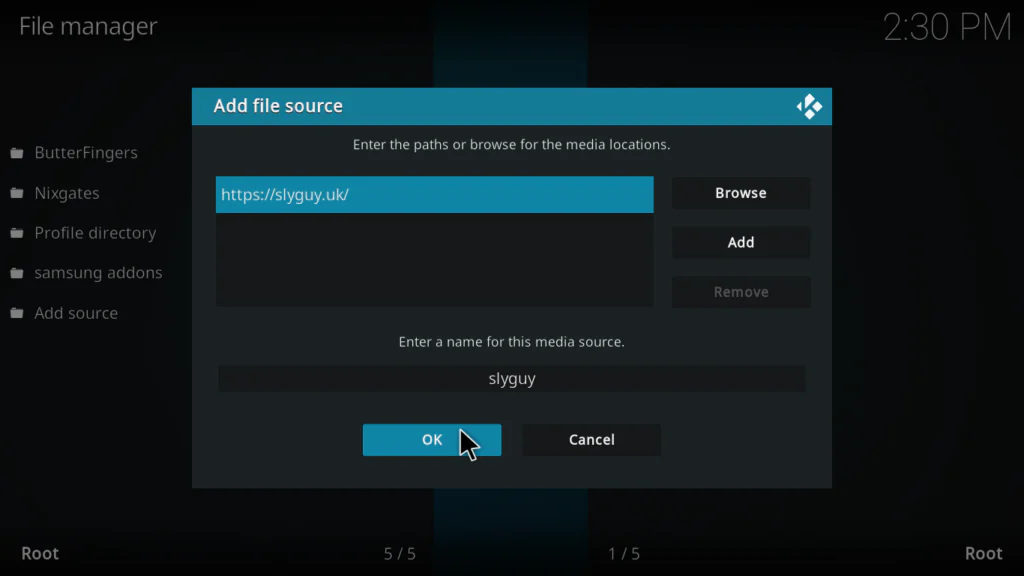
Tip: If https://slyguy.uk doesn’t respond, try the backup URL: https://k.slyguy.xyz — both lead to the same repository.
Step 3: Install the SlyGuy Repository Zip File
- Go back to the Kodi setting screen
- Click Add-ons
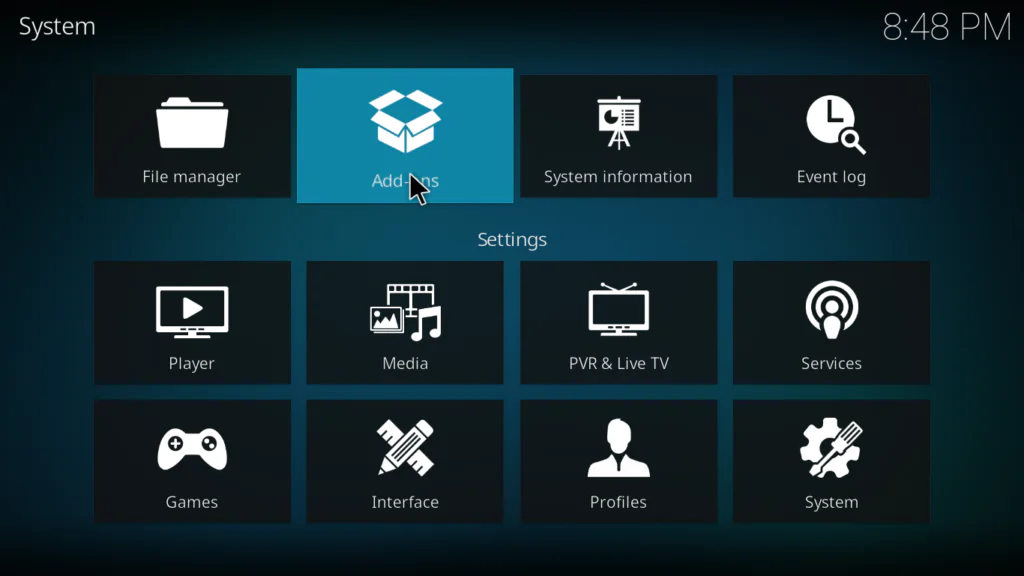
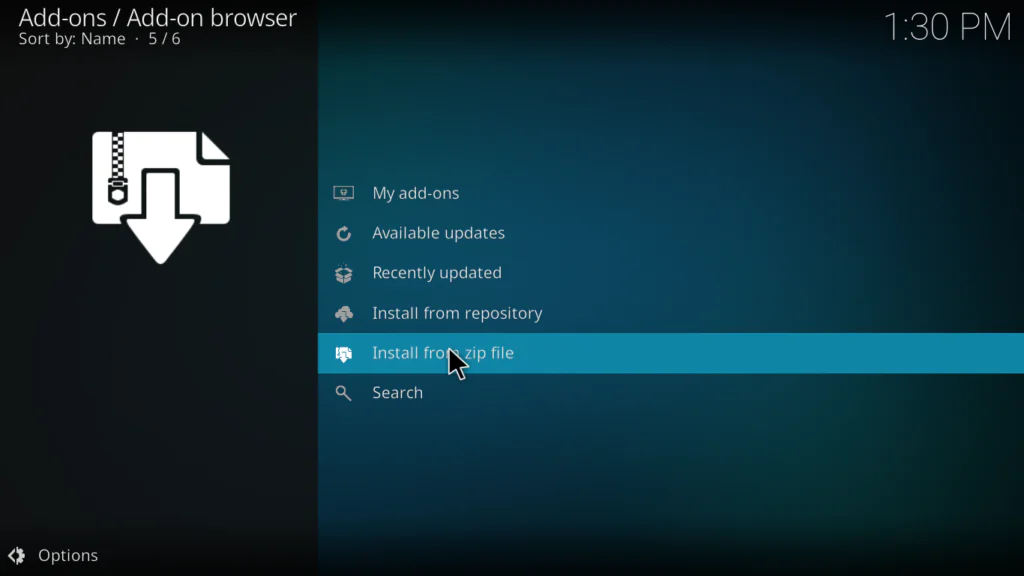
- Select Install from zip file
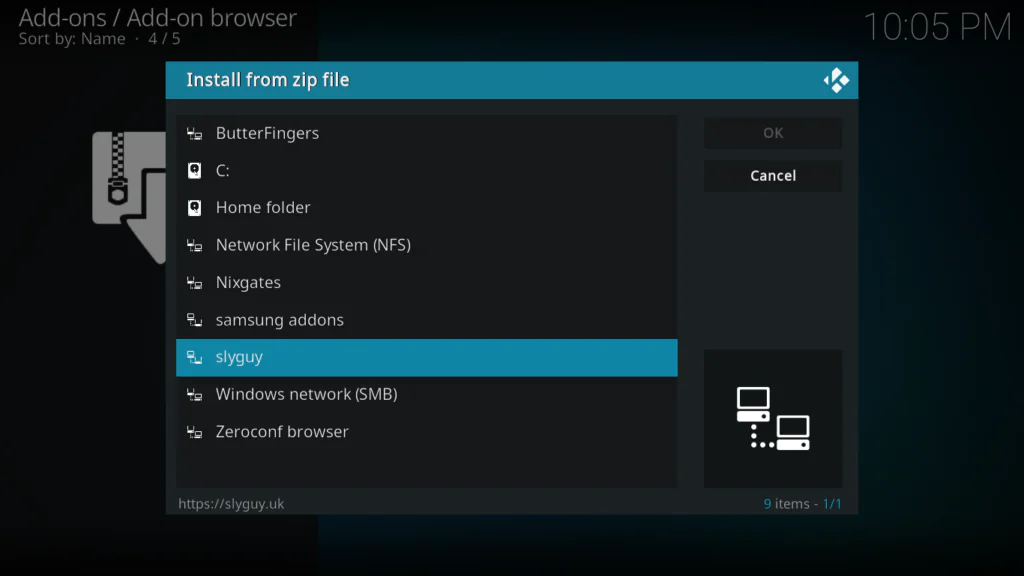
- Find and click slyguy from the file browser
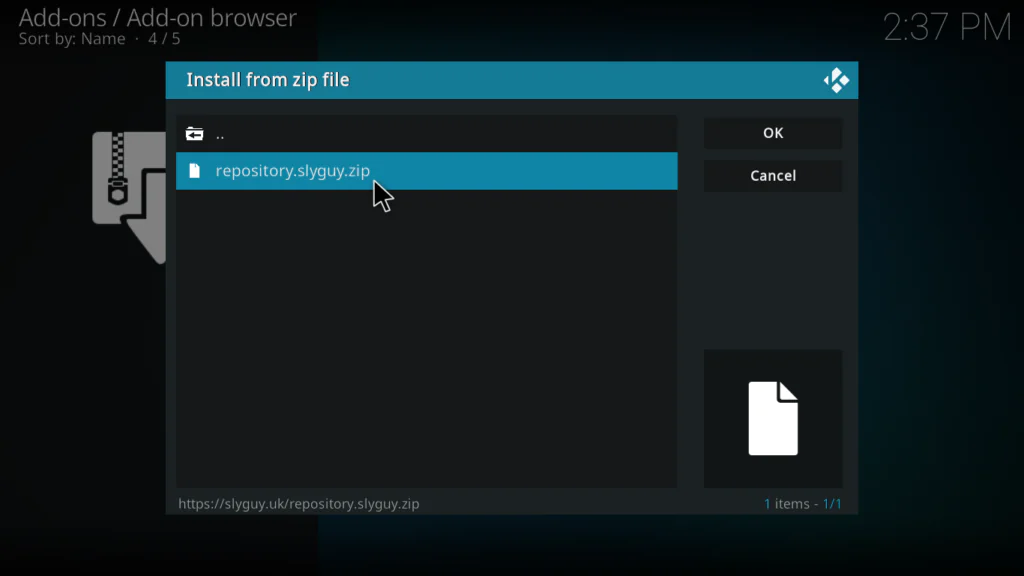
- Click repository.slyguy.zip
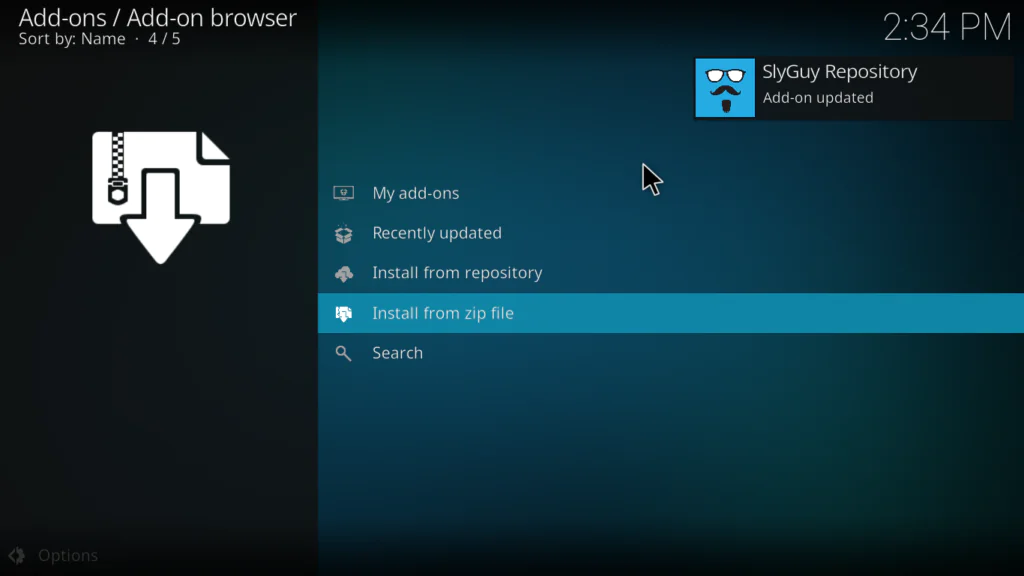
- Wait for the Repo Installed notification in the top right corner
Step 4: Install 7Plus from the SlyGuy Repository
- Still in the Package Installer, click Install from repository
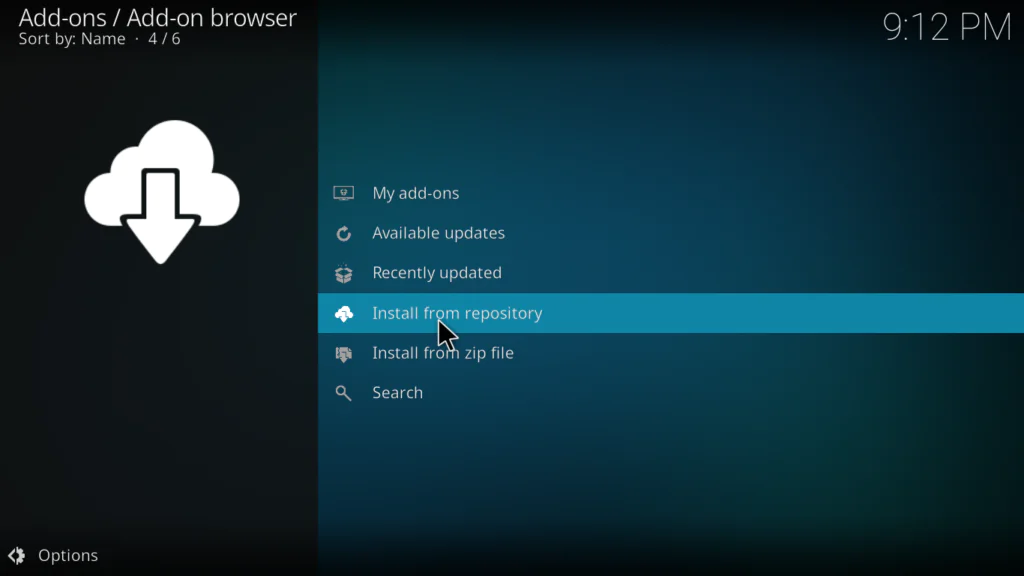
- Find and click SlyGuy Repository from the list
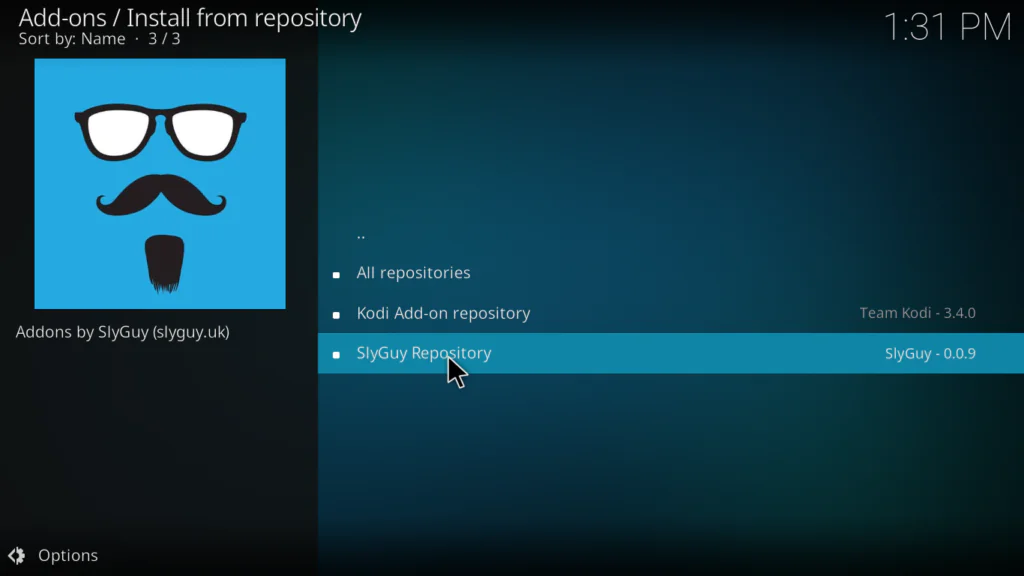
- Click Video Add-ons
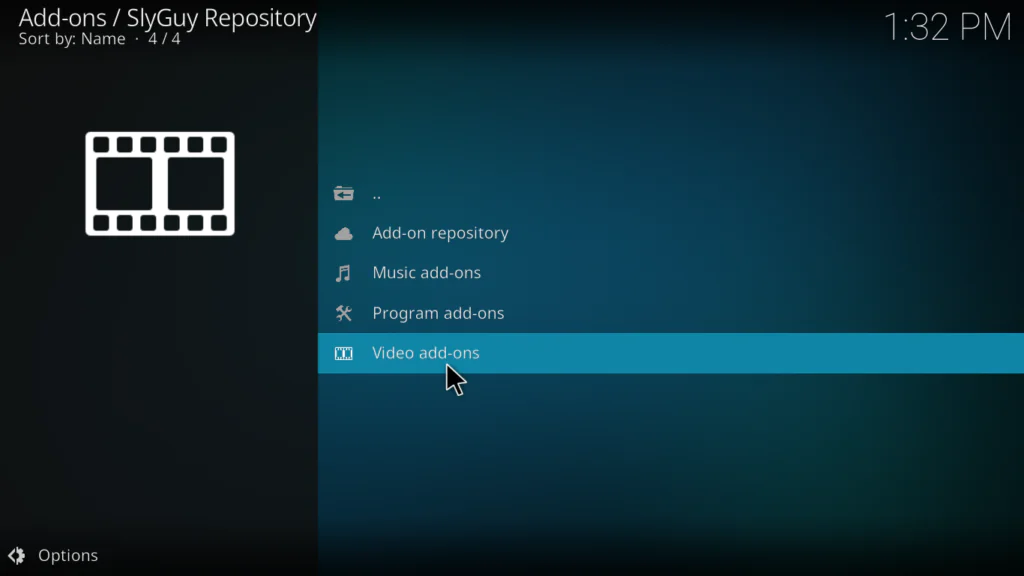
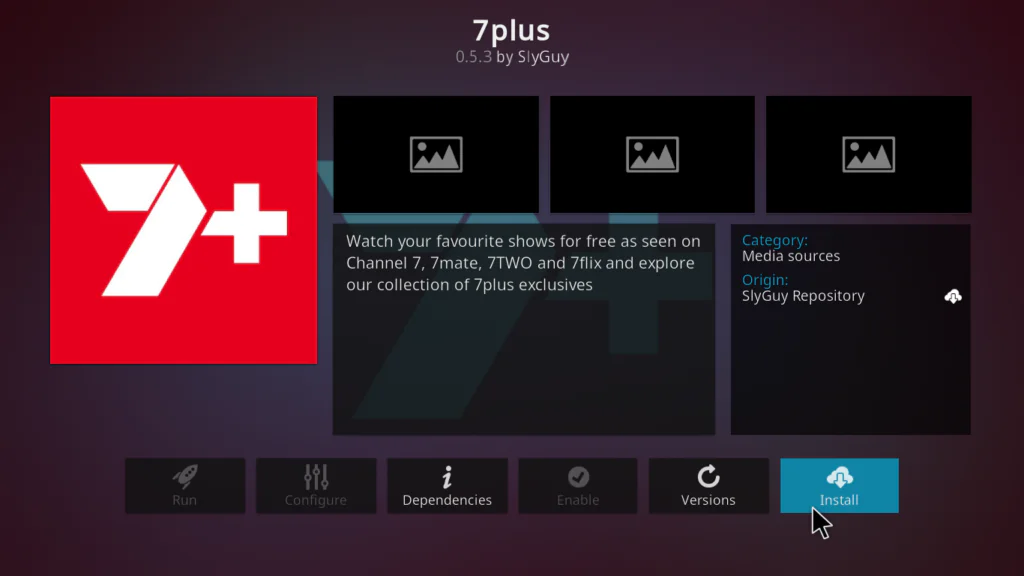
- Scroll down and find 7Plus in the list and click on it
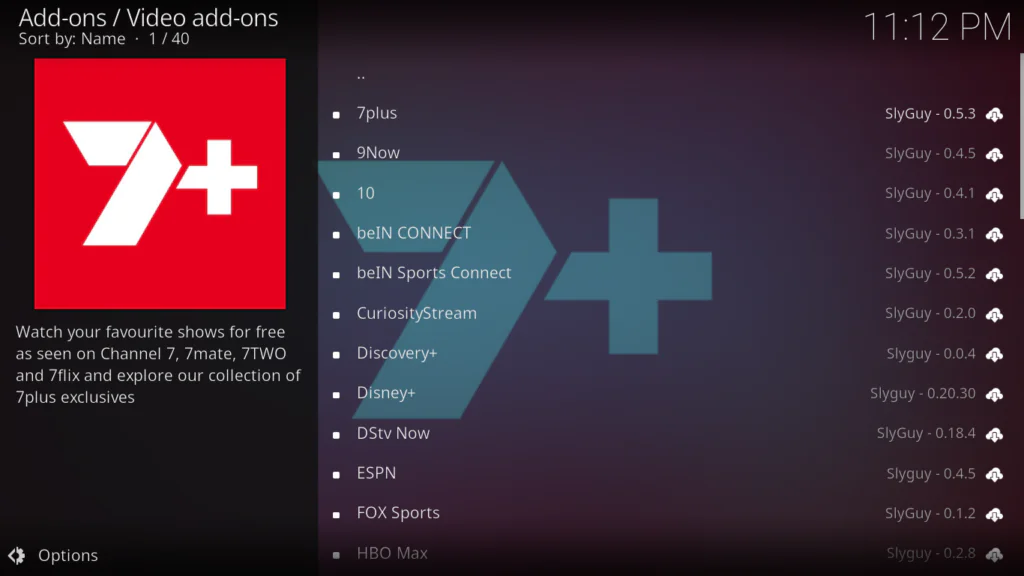
- Click Install
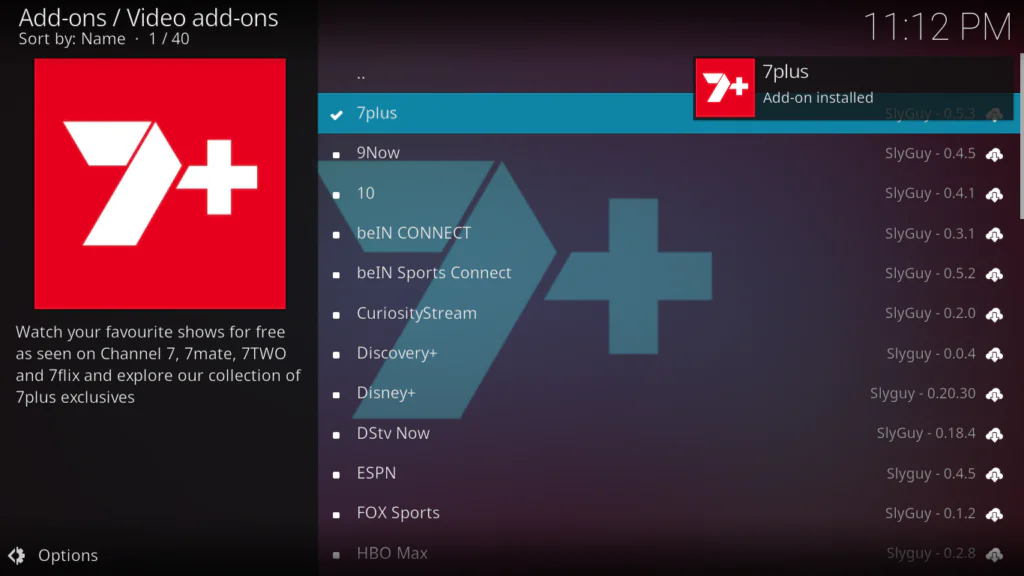
- Wait for the Add-on installed notification in the top right corner
Step 5: Open 7Plus and Start Watching
- Go back to the Kodi home screen
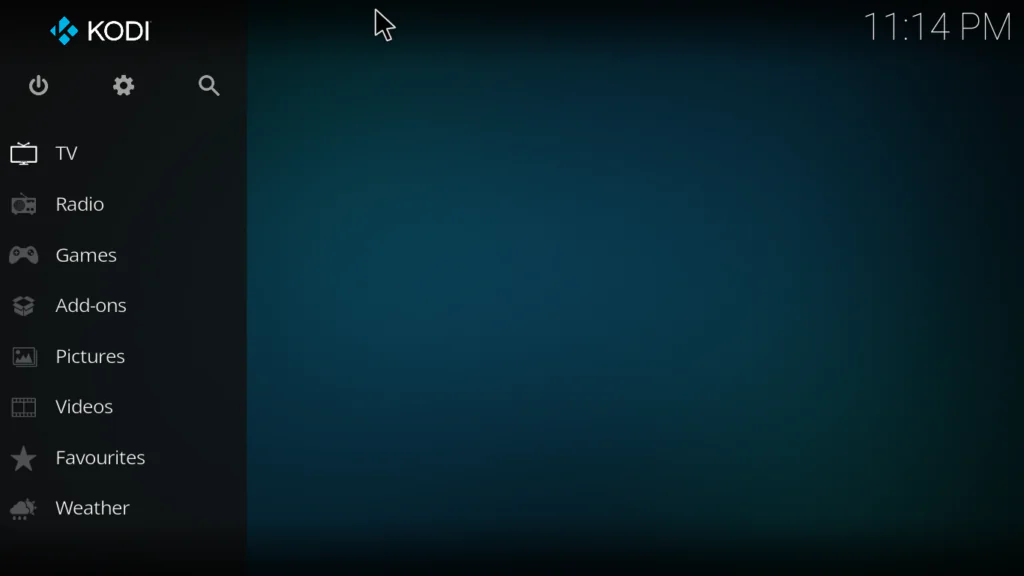
- Click Add-ons
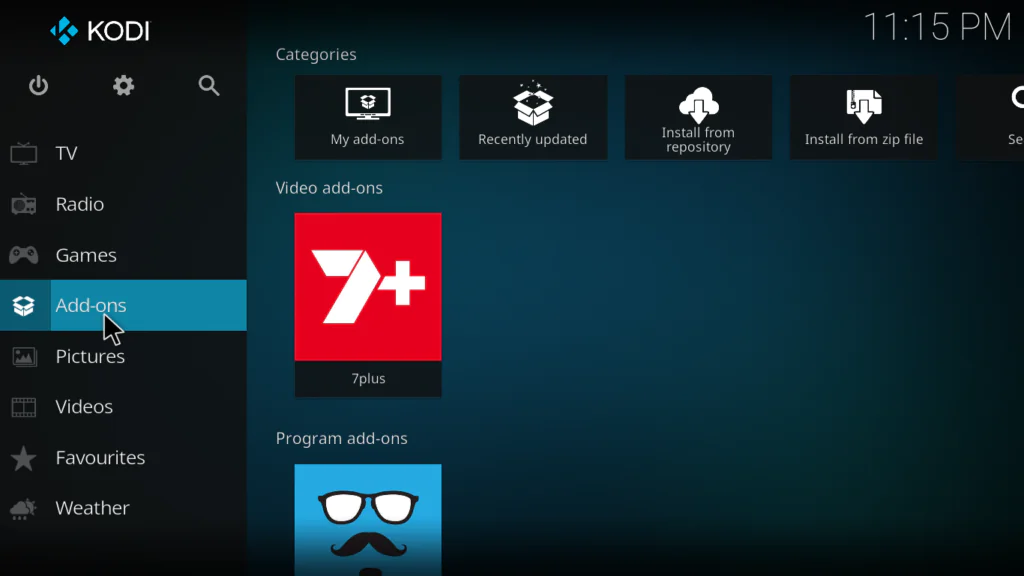
- Find 7Plus and click on it
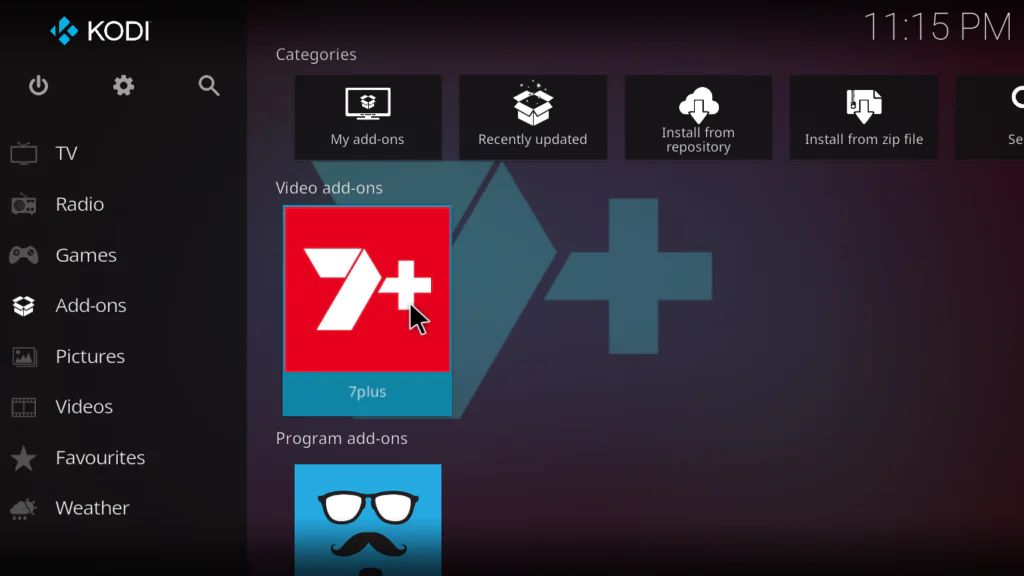
- The addon will open showing Home, Live, Shows, Movies, Sport, News, Categories, Search, and Bookmarks
- Click Live to start watching live Channel 7 networks
- Click Shows or Movies to browse the on-demand library
That’s it — you now have free access to Australia’s Channel 7 content directly inside Kodi.
How to Use the 7Plus Kodi Addon After Installing
Here’s a quick rundown of everything inside the addon:
- Home — featured content and recently added titles
- Live — all 5 Channel 7 live network streams
- Shows — full library of TV series available on demand
- Movies — free on-demand films across all genres
- Sport — live sports events and sports on demand
- News — live news streams and news on demand
- Categories — browse content by genre
- Search — find any show, movie, or channel by name
- Bookmarks — save favourite content for quick access
One important tip: if the addon asks you to sign in when accessing certain on-demand content, create a free 7Plus account at 7plus.com.au. It takes less than 2 minutes and unlocks the full content library.
My Personal Experience with the 7Plus Kodi Addon
I tested the 7Plus Kodi addon on a Kodi 21 setup and spent a good amount of time going through its different sections — and I was genuinely impressed.
What I liked most: The content variety. Most free Kodi addons give you either live TV or on-demand content — not both. With the 7Plus addon you get live Channel 7 networks plus a massive on-demand library all in one place. I watched several episodes of a drama series back to back and the streams were rock-solid with zero buffering on a 25 Mbps connection.
The ad-free experience was also a pleasant surprise. I tested it alongside the official 7Plus app and the Kodi addon had noticeably fewer commercial breaks — in some cases none at all during live TV. That alone makes it worth installing even if you already have access to 7Plus through another device.
What I didn’t like: Outside Australia, you need a VPN to access any content — without one, every stream returns an error. This is expected for a geo-restricted service, but it’s worth knowing upfront. Also, some premium on-demand content requires signing in with a free 7Plus account.
Who should install this: Anyone in Australia who wants to watch Channel 7 content on Kodi. Also anyone outside Australia who uses an Australian VPN server and wants access to a large library of free live TV and on-demand content. It’s one of the best regional streaming addons I’ve tested — easily one of the best Kodi addons available right now.
Tips to Get the Best Streaming Experience
Here are the things that make the biggest difference:
- Use a wired Ethernet connection instead of Wi-Fi — live TV is far more stable on a wired connection and buffering almost disappears
- If streams buffer, go into the addon Settings and lower the streaming quality — 7Plus has multiple bitrate options just like PBS Live
- Use a VPN with an Australian server if you’re outside Australia — without it no content will load
- Create a free 7Plus account at 7plus.com.au to unlock the full on-demand library — it’s free and takes 2 minutes
- Bookmark your favourite shows and live channels right away — it saves time every session
- Keep the SlyGuy Repository updated so you always have the latest version of the 7Plus addon
Pros and Cons of the 7Plus Kodi Addon
Pros:
- Completely free — no subscription or payment required
- Live TV from all 5 Channel 7 networks
- Massive on-demand library — shows, movies, sports, news, documentaries
- Ad-free or significantly reduced ads vs the official 7Plus app
- Live TV and VOD in one single addon
- Clean, well-organized interface with Search and Bookmarks
- Hosted on the trusted SlyGuy Repository — regularly updated
- Works on Kodi 20 and 21 on all major devices
Cons:
- Geo-restricted to Australia — VPN required outside Australia
- Some on-demand content requires a free 7Plus account
- Depends on SlyGuy Repository staying active
- Content is Australian-focused — less relevant for non-Australian audiences without a VPN
- Occasional stream errors on older or unsupported channel links
Troubleshooting Common Problems
Streams not loading — error message on playback
If you’re outside Australia, this is almost always a geo-restriction issue. Connect your VPN to an Australian server and try again. If you’re already in Australia and getting errors, try restarting the addon and clearing Kodi’s cache.
Addon says you need to sign in
Some on-demand content on 7Plus requires a free account. Go to 7plus.com.au, create a free account, then open the 7Plus addon Settings inside Kodi and enter your login details. It takes less than 2 minutes.
SlyGuy Repository installed but 7Plus not appearing
This can happen if the repository didn’t load completely. Go to Package Installer → Install from zip file and reinstall repository.slyguy.zip. Then try Install from repository again and look for 7Plus under Video Add-ons.
Live streams buffering constantly
Lower the streaming quality in the 7Plus addon Settings. Also switch from Wi-Fi to a wired connection — this is the single most effective fix for live TV buffering. If only certain channels buffer, try a different network stream within the same channel.
Addon disappeared after a Kodi update
Go back to Install from repository → SlyGuy Repository → Video Add-ons and reinstall 7Plus. You won’t need to add the repo source again as long as it was previously added in File Manager.
FAQs
Is the 7Plus Kodi addon completely free?
Yes — completely free. 7Plus itself is a free, ad-supported streaming platform. The Kodi addon gives you access to the same content without paying anything. Some on-demand content may ask for a free 7Plus account login.
Do I need to be in Australia to use the 7Plus Kodi addon?
7Plus is geo-restricted to Australia. If you’re outside Australia, you’ll need a VPN connected to an Australian server to access any content. With a VPN it works perfectly from anywhere in the world.
Where does the 7Plus Kodi addon come from?
It’s hosted in the SlyGuy Repository — one of the most trusted third-party Kodi repositories. The official repo URL is https://slyguy.uk.
Is the 7Plus Kodi addon really ad-free?
In most cases yes. The Kodi addon strips out the majority of ads that appear in the official 7Plus app. Some users report occasional brief ads on certain live streams, but it’s significantly less than the official app experience.
Does the 7Plus Kodi addon work on Amazon Fire Stick?
Yes. As long as Kodi is installed on your Fire Stick, the 7Plus addon works perfectly. Follow the exact same steps in this guide.
Does 7Plus work on Kodi 21 Omega?
Yes. The 7Plus Kodi addon through SlyGuy is fully compatible with both Kodi 20 Nexus and Kodi 21 Omega — the two most current versions as of 2026.
Conclusion
The 7Plus Kodi addon is one of the most complete free streaming addons available on Kodi in 2026 — especially for anyone who wants live TV and on-demand content in one place without paying anything.
Five live Channel 7 networks. Thousands of free shows, movies, and sports. Ad-free streaming. All inside Kodi.
Follow the 5 steps in this guide and you’ll have it up and running in under 10 minutes.
Got questions or hit a problem during installation? Drop a comment below — I reply to every single one.