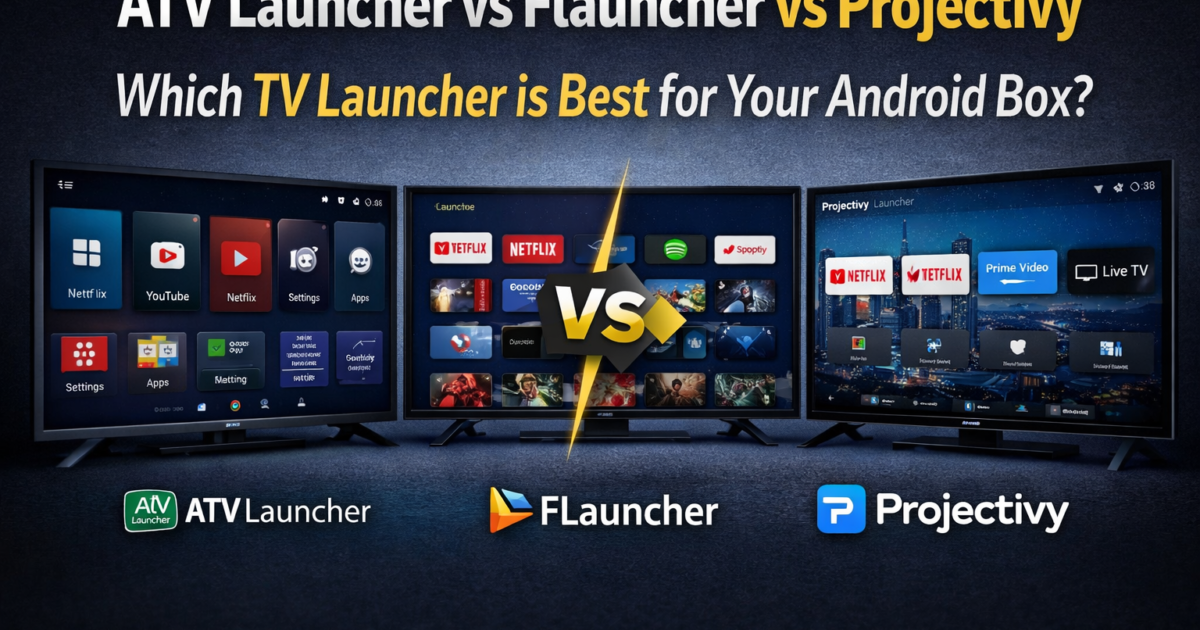
Best TV Launcher for Android Box — if your TV box looks like a phone with tiny icons, messy apps, and a remote that barely works on the home screen, you are not alone.
Most budget Android boxes like the T95, X96, and ZaapTV ship with Android Mobile OS instead of Android TV OS — if you want to understand exactly why this happens, read our full guide on why your TV box thinks it is a phone.
The fastest fix is installing a proper TV launcher. But which one is right for you?
This guide compares the three best options — ATV Launcher, FLauncher, and Projectivy Launcher — so you can decide in minutes and get back to watching.
━━━━━━━━━━━━━━━━━━━━━━━━━━━━━━━━━━
⚡ Quick Answer — Best TV Launcher at a Glance
━━━━━━━━━━━━━━━━━━━━━━━━━━━━━━━━━━
🥇 Best Overall → ATV Launcher Pro Download it directly from the Google Play Store Most polished, easiest to use, closest feel to real Android TV.
🆓 Best Free Option → FLauncher 100% free, zero ads, open-source, works great on slow boxes.
🎛️ Best for Customization → Projectivy Launcher Maximum flexibility, ideal for advanced users who want full control.
👉 Not sure which one? If you are a beginner, install ATV Launcher. If you want free with no ads, choose FLauncher. If you want to customize everything, go with Projectivy.
━━━━━━━━━━━━━━━━━━━━━━━━━━━━━━━━━━
📺 What Is a TV Launcher — And Why Do You Need One?
━━━━━━━━━━━━━━━━━━━━━━━━━━━━━━━━━━
A TV launcher is an app that replaces the home screen of your Android box. Instead of the cramped phone-style grid your box ships with, a TV launcher gives you large icons, horizontal rows, and proper remote-control navigation — the way a TV interface should work.
It does not change your operating system. It simply sits on top of it and changes how everything looks and feels.
You need a TV launcher if:
→ Your TV box home screen looks like a smartphone → Your remote does not navigate the home screen properly → Apps open in portrait mode or show phone-style layouts → You own a ZaapTV, T95, X96, MXQ Pro, or any Android Mobile box
The right best TV launcher for Android box can completely transform your viewing experience in under 5 minutes.
━━━━━━━━━━━━━━━━━━━━━━━━━━━━━━━━━━
📊 Side-by-Side Comparison Table
━━━━━━━━━━━━━━━━━━━━━━━━━━━━━━━━━━
| Feature | ATV Launcher | FLauncher | Projectivy |
|---|---|---|---|
| 💰 Price | Free / Pro paid | 100% Free | Free / Pro paid |
| 🖱️ Ease of use | ⭐⭐⭐⭐⭐ Very easy | ⭐⭐⭐⭐ Easy | ⭐⭐⭐ Medium |
| ⚡ Speed on slow boxes | ✅ Good | ✅✅ Excellent | ✅ Good |
| 🎨 Customization | ⚙️⚙️ Medium | ⚙️ Basic | ⚙️⚙️⚙️ Very high |
| 📢 Ads (free version) | ❌ Yes | ✅ None | ✅ None |
| 🔓 Open source | ❌ No | ✅ Yes | ❌ No |
| 📦 Works without Play | ✅ Yes (APK) | ✅ Yes (APK) | ✅ Yes (APK) |
| 👤 Best for | Beginners | Budget / Ad-free | Advanced users |
━━━━━━━━━━━━━━━━━━━━━━━━━━━━━━━━━━
🔵 ATV Launcher — Best for Beginners
━━━━━━━━━━━━━━━━━━━━━━━━━━━━━━━━━━
What is it?
ATV Launcher is the most widely used TV launcher for Android Mobile boxes. It mimics the look and feel of real Android TV OS — horizontal rows, large app icons, full remote support. Available on Google Play and as a direct APK.
The free version works well but shows occasional ads. ATV Launcher Pro removes all ads for a one-time payment.
✅ Pros
→ Easiest setup of the three — works right out of the box → Looks very close to the real Android TV interface → Huge user base with lots of tutorials and guides online → Supports app rows, favorites, and recently used apps → Compatible with ZaapTV, T95, X96, and most Android Mobile boxes
❌ Cons
→ Free version has ads on the home screen → Less customizable than Projectivy → Closed source — depends on one developer for future updates
💡 Best Use Case
New to TV boxes and want something that works in under 5 minutes. Do not want to spend time configuring settings. Willing to pay a small amount to remove ads permanently.
📌 Real-World Note
ATV Launcher runs smoothly on low-end boxes with 1–2GB RAM such as the X96 Mini and T95. It does not need a powerful processor, making it reliable for older and budget devices.
━━━━━━━━━━━━━━━━━━━━━━━━━━━━━━━━━━
🟦 FLauncher — Best Free and Ad-Free Option
━━━━━━━━━━━━━━━━━━━━━━━━━━━━━━━━━━
What is it?
FLauncher is a completely free, open-source TV launcher with no ads, no paid version, and no limitations. Everything is free. The project is maintained on GitHub and updated regularly by the developer community.
The interface is clean and minimal — not as feature-rich as the others, but fast, stable, and genuinely ad-free.
✅ Pros
→ 100% free — no ads, no upsells, no paid version → Open-source — transparent, trustworthy, community-maintained → Lightest launcher of the three — fastest on weak hardware → Simple remote navigation that just works → No account or sign-in required
❌ Cons
→ Less polished visually compared to ATV Launcher → Fewer customization options than Projectivy → Smaller community — fewer tutorials available → Interface may feel too basic for some users
💡 Best Use Case
On a tight budget with no intention of paying for an app. Hate ads on your home screen. Using a very old or very slow box where performance matters most.
📌 Real-World Note
FLauncher is the most reliable choice for boxes with only 1GB RAM — original X96, old MXQ boxes. If you own an X96, also check our best settings for X96 Mini to squeeze more performance out of your device. or any device that already runs slowly. Because it is so lightweight, it rarely causes crashes or slowdowns even on the weakest hardware.
━━━━━━━━━━━━━━━━━━━━━━━━━━━━━━━━━━
⚙️ Projectivy Launcher — Best for Advanced Users
━━━━━━━━━━━━━━━━━━━━━━━━━━━━━━━━━━
What is it?
Projectivy is the most customizable TV launcher available for Android boxes. It offers layout options, widget support, custom backgrounds, app categories, and detailed configuration settings. The free version covers most needs — Pro unlocks extra themes and advanced features.
It is built for users who want their home screen to work exactly how they want it, not just a basic TV-style replacement.
✅ Pros
→ Highest customization level of any TV launcher → Supports widgets, custom backgrounds, and app categories → No ads in the free version → Actively developed with frequent updates → Also works well on certified Android TV devices
❌ Cons
→ Takes longer to set up — more options means more decisions → Can feel overwhelming for beginners → Some advanced features locked behind Pro version → Slightly heavier than FLauncher on very weak hardware
💡 Best Use Case
You want your TV box home screen to look and behave a specific way. You use your box for multiple purposes — IPTV, streaming, gaming, and media. You enjoy spending time organizing and personalizing your setup.
📌 Real-World Note
Projectivy works best on mid-range boxes like the X96 Max Plus and X98H Pro with 2–4GB RAM. On boxes with 1GB RAM, choose FLauncher instead for a smoother experience.
━━━━━━━━━━━━━━━━━━━━━━━━━━━━━━━━━━
🎯 Which One Should YOU Choose?
━━━━━━━━━━━━━━━━━━━━━━━━━━━━━━━━━━
Choosing the best TV launcher for Android box depends entirely on your needs and your device.
💸 Want totally free with no ads → Choose FLauncher — zero cost, zero ads, works perfectly.
🔧 Advanced user who wants full control → Choose Projectivy — spend 20 minutes setting it up once, get the best result.
🐢 Old or slow box with 1GB RAM → Choose FLauncher — lightest option, will not slow your device down.
📡 Mainly use your box for IPTV or ZaapTV channels → Choose ATV Launcher or FLauncher — reliability and easy navigation matter more than customization for IPTV users.
📺 Want the closest experience to real Android TV OS → Choose ATV Launcher Pro — the paid version looks and feels almost identical to the real thing.
━━━━━━━━━━━━━━━━━━━━━━━━━━━━━━━━━━
🔧 How to Install a TV Launcher (Step-by-Step)
━━━━━━━━━━━━━━━━━━━━━━━━━━━━━━━━━━
Step 1 — Enable Unknown Sources Go to Settings → Security → enable Unknown Sources or Install Unknown Apps. This allows APK installs from outside Google Play.
Step 2 — Download the Launcher APK : Open a browser or the Downloader app on your box. Search for your chosen launcher by name and download the APK file directly to the device. You can also visit our software downloads page for trusted APK files.
Step 3 — Install the APK Open the downloaded file using your file manager. Tap Install and wait about 10 seconds for the installation to complete.
Step 4 — Set as Default Launcher Press the Home button on your remote. A popup will appear asking which app to use. Select your new launcher and tap ALWAYS — not “Just Once.”
Step 5 — Restart Your Box Restart the device. The new TV-style home screen will now load automatically every time the box turns on.
⏱ Total time: less than 5 minutes from start to finish.
━━━━━━━━━━━━━━━━━━━━━━━━━━━━━━━━━━
⚠️ Common Mistakes to Avoid
━━━━━━━━━━━━━━━━━━━━━━━━━━━━━━━━━━
❌ Mistake 1 — Downloading the mobile version instead of the TV version ATV Launcher and Projectivy both have mobile APKs and TV APKs. Always search specifically for the TV or Android TV version. Installing the mobile version defeats the entire purpose.
❌ Mistake 2 — Tapping “Just Once” instead of “Always” If you tap Just Once when the default launcher popup appears, the old phone-style home screen will return after every reboot. Always tap Always.
❌ Mistake 3 — Installing a heavy launcher on a weak box Projectivy and ATV Launcher need at least 2GB RAM to run smoothly. If your box has 1GB RAM and already runs slowly, install FLauncher instead.
❌ Mistake 4 — Not restarting the box after installation Some boxes do not apply the new launcher until they are fully restarted. If your home screen looks unchanged after installing, reboot the device.
❌ Mistake 5 — Expecting the launcher to fix everything A TV launcher fixes the home screen and navigation. It does not automatically turn phone apps into TV apps. If Netflix or YouTube still looks like a phone app, you need to sideload the Android TV versions of those apps separately.
━━━━━━━━━━━━━━━━━━━━━━━━━━━━━━━━━━
💡 Pro Tips From Real-World Use
━━━━━━━━━━━━━━━━━━━━━━━━━━━━━━━━━━
📌 Some boxes reset to the original launcher after reboot Certain TV boxes are programmed to force the stock launcher on startup. If your new launcher disappears after rebooting, install a Launcher Manager app — it permanently locks your chosen launcher as the default even on stubborn devices.
📌 You can test two launchers before committing Install both ATV Launcher and FLauncher, try each for a day, then set the one you prefer as permanent default. You can switch anytime through Settings → Apps → Default Apps.
📌 Update your launcher regularly Outdated launchers can crash or conflict with Android system updates. Check for launcher updates every few months to stay stable.
📌 Pair your launcher with Android TV app APKs After installing a TV launcher, also sideload the Android TV versions of YouTube, Netflix, and Plex. Together, this combination gives you an experience very close to a real Android TV device — even on a budget box.
📌 ZaapTV users — keep it simple If you use your ZaapTV mainly for IPTV and satellite channels, ATV Launcher or FLauncher is all you need. The extra complexity of Projectivy is not worth it if you only use two or three apps regularly.
━━━━━━━━━━━━━━━━━━━━━━━━━━━━━━━━━━
✅ Key Takeaways
━━━━━━━━━━━━━━━━━━━━━━━━━━━━━━━━━━
→ A TV launcher replaces the phone-style home screen on Android Mobile boxes — the fastest interface fix available → ATV Launcher is best for beginners — easy, polished, and widely supported → FLauncher is best for free and ad-free users — lightweight, open-source, perfect for slow boxes → Projectivy Launcher offers the deepest customization — best for advanced users who want full control → Always tap “Always” when setting your default launcher — never “Just Once” → A launcher fixes the interface, not the apps — sideload Android TV APKs separately for the full experience → If your box has only 1GB RAM, always choose FLauncher for the best performance
━━━━━━━━━━━━━━━━━━━━━━━━━━━━━━━━━━
❓ Frequently Asked Questions
━━━━━━━━━━━━━━━━━━━━━━━━━━━━━━━━━━
Q: Which TV launcher is the fastest? A: FLauncher is the fastest and most lightweight of the three. It is designed to perform well on low-end hardware with minimal RAM. ATV Launcher and Projectivy are also fast on boxes with 2GB RAM or more.
Q: Is FLauncher really better than ATV Launcher? A: It depends on your needs. FLauncher is better if you want zero ads and the lightest possible experience. ATV Launcher is better if you want a more polished, feature-rich interface and do not mind ads or a small one-time payment for Pro.
Q: Can a launcher fix all TV box problems? A: No. A launcher fixes the home screen and navigation. It does not fix slow performance caused by weak hardware — if your box is still lagging after installing a launcher, read our guide on why your TV box is so slow.
, buffering from poor internet, or app quality issues from mobile-only APKs. Those require separate solutions.
Q: Do I need to root my TV box to install a TV launcher? A: No. All three launchers install as standard APK files. No root access is needed. You only need to enable Unknown Sources in Settings, which is a standard Android feature available on every device.
Q: What if my TV box resets to the old launcher after every reboot? A: Some boxes are programmed to reload the stock launcher on startup. Install a Launcher Manager app to permanently lock your chosen launcher as the default — even after reboots and power cuts.
📌 Related Guides
Install Apps on X96 Mini — Complete 2026 Guide
Install apps on X96 Mini — it sounds technical, but it really isn’t. Whether you want Netflix, YouTube,…